
Combining a Right Triangle and Two Squares
Loading the math board and drawing, please wait…
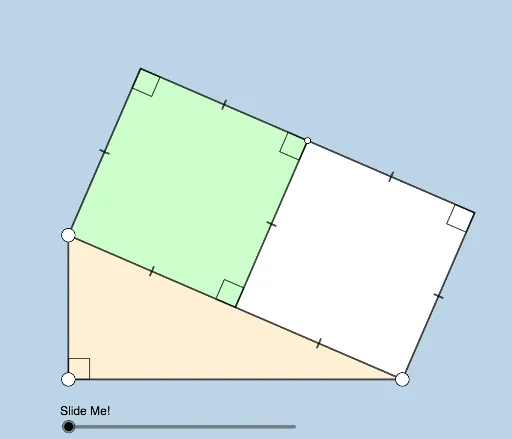
This example demonstrates how to combine a right triangle with two squares to create intriguing geometric figures. The core math concepts involved include geometric construction, similar triangles, ratios, and trigonometric functions. The construction uses commands like Segment, OrthogonalLine, Point, Midpoint, Polygon, Ray, Angle, Dilate, Circle, Intersect, Rotate, CircleSector, Semicircle, Vector, Translate, and Line in GeoGebra. It is suitable for high school students to explore, helping them understand geometric transformations and the relationship between function graphs and geometric shapes.
GeoGebra Commands & Parameters
Segment(A, B) → fOrthogonalLine(A, f) → gPoint(g) → CSegment(C, B) → hMidpoint(h) → DPolygon(C, D, 4) → poly1, i, j, k, l, E, FPolygon(D, B, 4) → poly2, m, n, p, q, G, HRay(A, H) → rPolygon(B, C, A) → t1, a, b, cSegment(C, F) → tSegment(F, H) → dSegment(H, D) → eSegment(H, G) → f_1Segment(G, B) → g_1Segment(C, D) → sSegment(D, B) → h_1Angle(C, F, H) → βAngle(F, H, D) → γAngle(H, D, C) → δAngle(H, G, B) → εDilate(A, If[4 < o ≤ 5, 5 - o, 0], H) → A'Segment(A, A') → i_1Segment(A, C) → j_1Dilate(B, If[0 < o ≤ 1, 1 - o, 0], H) → B'Segment(B, B') → k_1Circle(H, (0.4 * Min[{j_1, e, f}])) → c_1Intersect(c_1, e, 1) → IIntersect(c_1, f_1, 1) → JRotate(J, If[1 < o ≤ 2, ((-(o - 1)) * π / 4), ((-π)) / 4], H) → J'CircleSector(H, J', J) → d_1Rotate(d_1, If[3 < o ≤ 4, ((-(o - 3)) * π / 4), ((-π)) / 4], H) → e_1Semicircle(A, H) → p_1Midpoint(i_1) → KRotate(H, If[6 < o ≤ 7, ((o - 6) * π), π], K) → H'Vector(H, H') → uTranslate(e_1, u) → q_1Line(A, k_1) → l_1Point(l_1) → LAngle(L, A, H) → αRotate(q_1, If[6 < o ≤ 7, ((o - 6) * α), α], H') → r_1Angle(B, A, C) → ζ
AI Drawing Prompt Reference
Draw a right triangle and two squares at its right-angle vertex. Connect the hypotenuse of the triangle to one side of the squares, find the midpoint of the hypotenuse, and draw a circle centered there intersecting the other sides. Combine the triangle and squares using rotations and scaling transformations to create intricate geometric figures, labeling key angles and transformation relationships.
The prompt above was compiled from the original drawing commands and is for reference only.