
Coloring Edges and Faces of a 24‑Vertex Polyhedron and Its Dual
Loading the math board and drawing, please wait…
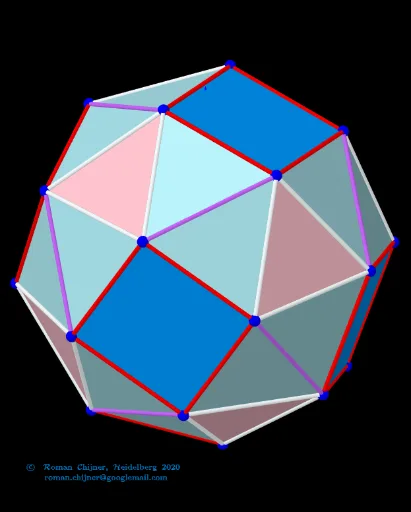
① This example visualizes a polyhedron with 24 vertices and its dual, allowing interactive coloring of edges and faces to explore their relationships. ② Core mathematical concepts include polyhedra, dual polyhedra, graph coloring, combinatorics, geometric transformations, and vector analysis. ③ Construction highlights use GeoGebra commands such as Sequence, Sphere, Circle, PointIn, Angle, Segment, Sort, First, KeepIf, and objects like A00d, A0d to store vertex and edge data, with buttons for toggling colors and zooming. ④ It is suitable for high‑school or undergraduate geometry courses, math contest preparation, and teaching demonstrations of polyhedral duality and graph coloring problems.
GeoGebra Commands & Parameters
Sequence(((zoom * Element[Element[A00d, i], 1]), (zoom * Element[Element[A00d, i], 2]), (zoom * Element[Element[A00d, i], 3])), i, 1, Length[A00d]) → A0dSequence(((zoom * Element[Element[A00, i], 1]), (zoom * Element[Element[A00, i], 2]), (zoom * Element[Element[A00, i], 3])), i, 1, Length[A00]) → A0Sphere(O, r_o) → sp02dTextfield(R1sphere) → InputBox5Sphere(O, R1sphere) → sp01Textfield(r_o) → InputBox6Textfield(jarc) → InputBox8Textfield(jarc_d) → InputBox9Textfield(f_{Poly}) → InputBox11Textfield(k) → InputBox15Textfield(k_d) → InputBox14TableText({Append["i", 1…Length[mm5a]], Append["\fgcolor{orange}{n}", mm5a], Append["\fgcolor{orange}{N}", mm7a], Append["\fgcolor{#007FFF}{n/dual}", mm5ad], Append["\fgcolor{#007FFF}{N}", mm7ad]}, "hr") → text24Textfield(iseg) → InputBox17Textfield(f_{Poly}d) → InputBox18Textfield(isegd) → InputBox19UnicodeToLetter(34) → u34TableText({Append["i", 1…Max[Length[Segn], Length[Segnd]]], Append["\fgcolor{orange}{s_i}", Segn / Segments_o1], Append["\fgcolor{orange}{N}", lLength], Append["\fgcolor{#007FFF}{s_id}", Segnd / Segments_o1d], Append["\fgcolor{#007FFF}{N}", lLengthd]}, "hr") → text23Textfield(n_3) → InputBox20If(n_3 ≟ 0, "", Text["" + n_3]) → txt_3Textfield(nd_3) → InputBox21If(nd_3 ≟ 0, "", Text["" + nd_3]) → txtd_3Circle(A_{farbe}, rfabe) → farbekreisPointIn(farbekreis) → AAngle(A) → αSegment(C, D) → hSort(Sequence[Segment[Element[A0, Element[Element[nom, i], 1]], Element[A0, Element[Element[nom, i], 2]]], i, 1, Length[nom]]) → SegmentsFirst(Segments, i_s) → Segments_oKeepIf(round((x * 10^(k))) / 10^(k) ≟ Element[Segn, 1], Segments) → la1KeepIf(round((x * 10^(k))) / 10^(k) ≟ Element[Segn, 2], Segments) → la2KeepIf(round((x * 10^(k))) / 10^(k) ≟ Element[Segn, 3], Segments) → la3KeepIf(round((x * 10^(k))) / 10^(k) ≟ Element[Segn, 4], Segments) → la4Sequence(Polygon[Element[A0, Element[Element[mm1, f], 1]], Element[A0, Element[Element[mm1, f], 2]], Element[A0, Element[Element[mm1, f], 3]]], f, 1, Length[mm1]) → poly_{3}KeepIf(round((x * 10^(k))) / 10^(k) ≟ Element[poly_{3}S, 1], poly_{3}) → poly_{3}1KeepIf(round((x * 10^(k))) / 10^(k) ≟ Element[poly_{3}S, 2], poly_{3}) → poly_{3}2Sequence(Polygon[Sequence[A0(mm6(1, f, k)), k, 1, Length[mm6(1, 1)]]], f, 1, Length[mm6(1)]) → poly_{4}Sort(Sequence[Segment[Element[A0d, Element[Element[nomd, i], 1]], Element[A0d, Element[Element[nomd, i], 2]]], i, 1, Length[nomd]]) → SegmentsdFirst(Segmentsd, id_s) → Segmentsd_oKeepIf(round((x * 10^(k))) / 10^(k) ≟ Element[Segnd, 1], Segmentsd) → lad1KeepIf(round((x * 10^(k))) / 10^(k) ≟ Element[Segnd, 2], Segmentsd) → lad2KeepIf(round((x * 10^(k))) / 10^(k) ≟ Element[Segnd, 3], Segmentsd) → lad3KeepIf(round((x * 10^(k))) / 10^(k) ≟ Element[Segnd, 4], Segmentsd) → lad4KeepIf(round((x * 10^(k))) / 10^(k) ≟ Element[Segnd, 5], Segmentsd) → lad5Sequence(Polygon[Element[A0d, Element[Element[mm1d, f], 1]], Element[A0d, Element[Element[mm1d, f], 2]], Element[A0d, Element[Element[mm1d, f], 3]]], f, 1, Length[mm1d]) → polyd_{3}KeepIf(round((x * 10^(k))) / 10^(k) ≟ Element[poly_{3}Sd, 1], polyd_{3}) → polyd_{3}1KeepIf(round((x * 10^(k))) / 10^(k) ≟ Element[poly_{3}Sd, 2], polyd_{3}) → polyd_{3}2KeepIf(round((x * 10^(k))) / 10^(k) ≟ Element[poly_{3}Sd, 3], polyd_{3}) → polyd_{3}3
AI Drawing Prompt Reference
Create a 3D scene showing a polyhedron with 24 vertices and its dual polyhedron. Color the original polyhedron's edges orange and its faces a light orange shade; color the dual polyhedron's edges blue and its faces a light blue shade. Position the two polyhedra so that corresponding vertices and faces align, and include a zoom control to adjust the viewing angle.
The prompt above was compiled from the original drawing commands and is for reference only.