
Collecting Like Terms Practice
Loading the math board and drawing, please wait…
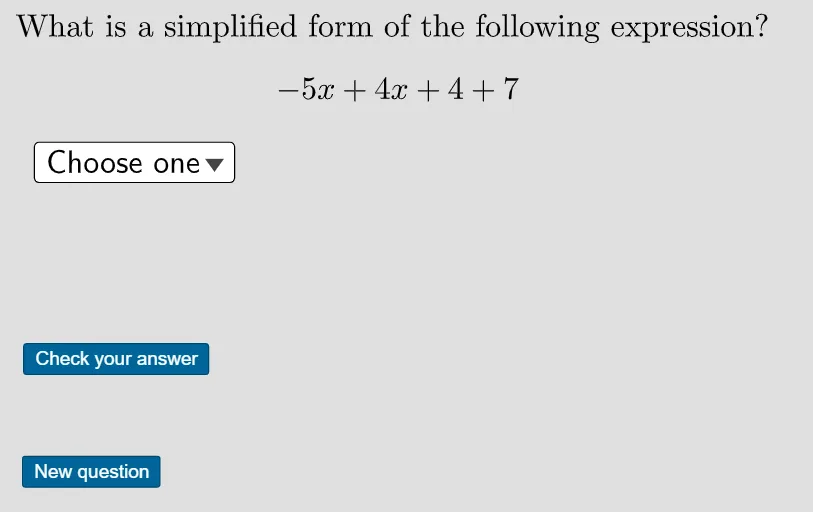
This example provides an interactive practice to help students master the concept of collecting like terms. It demonstrates how to simplify algebraic expressions by combining like terms. Various GeoGebra commands such as RandomElement, Shuffle, and Append are used to dynamically generate questions. Suitable for middle school and above students for basic algebra practice.
GeoGebra Commands & Parameters
RandomElement({-6, -5, -4, -3, 3, 4, 5, 6}) → constant2Text(If[constant2 < 0, "-", "+"]) → constant2signRandomElement({-6, -5, -3, -1, 1, 3, 5, 6}) → variable1Text(If[abs(variable1) ≠ 1, abs(variable1), ""]) → variable1valueText(If[variable1 < 0, "-", ""]) → variable1negRandomElement({-7, -2, -1, 1, 2, 7}) → constant1Text(If[constant1 < 0, "-", "+"]) → constant1signRandomElement({-7, -4, -2, 2, 4, 7}) → variable2Text(If[variable2 < 0, "-", "+"]) → variable2signText(If[abs(variable2) ≠ 1, abs(variable2), ""]) → variable2valueShuffle(xtermfirst) → shufflextermfirst, {"+4x", "+4", "+7"}Remove(shufflextermfirst, {otherconstant1, otherconstant2}) → onevariableRemove(shufflextermfirst, {otherxterm1}) → twoconstantsText(If[constantdifference > 0, "-", "+"]) → constantdifferencesignwrongText(If[constantdifference < 0, "-", "+"]) → constantdifferencesignText(If[constantsum < 0, "+", "-"]) → constantsumsignwrongText(If[constantsum < 0, "-", "+"]) → constantsumsignText(If[xdifference > 0, "-", ""]) → xdifferencesignwrongText(If[abs(xdifference) ≠ 1, abs(xdifference), ""]) → xdifferencevalueText(If[xdifference < 0, "-", ""]) → xdifferencesignText(If[xsum > 0, "-", ""]) → xsumsignwrongText(If[abs(xsum) ≠ 1, abs(xsum), ""]) → xsumvalueText(If[xsum < 0, "-", ""]) → xsumsignShuffle(wrongs) → shufflewrongs, {"x-11", "-9x+11", "9x-3", "9x+11", "x-3", "-9x+3", "9x+3", "x+11", "-x+3", "-x-11", "-9x-3", "9x-11", "x+3", "-9x-11", "-x-3"}Shuffle(choices) → shuffledchoices, {"-9x+11", "x-11", "-x+11", "9x-3"}Append("$\textsf{Choose one}$", shuffledchoices) → userinputCorner(5) → dimsText(If[constant1 < 0, "-", ""]) → constant1negText(If[variable1 < 0, "-", "+"]) → variable1signRandomElement({firsttermx, firsttermconstant}) → firstterm, "-5x"Shuffle(constantfirst) → shuffleconstantfirst, {"+4x", "+4", "-5x"}RandomElement({VARIABLEFIRST, CONSTANTFIRST}) → question, "-5x+4x+4+7"Remove(shuffleconstantfirst, {otherxterm1, otherxterm2}) → oneconstantRemove(shuffleconstantfirst, {otherconstant1}) → twovariablesIf(IndexOf["+", twovariables1] ≠ 1, twovariables1, Take[twovariables1, 2]) → twovariablesnonegIndexOf(twovariables1, "+") → testIf(question ≟ VARIABLEFIRST, Solx, SolConst) → reordered
AI Drawing Prompt Reference
Create an algebra practice interface with a randomly generated polynomial expression in the center, such as "-5x+4x+4+7". Below it, display four clickable option buttons, each showing a simplified expression, including one correct answer and three distractors. At the top, include the title "Collecting Like Terms Practice" and a prompt "Choose one". Use clear sans-serif fonts, a light background, and rounded rectangular buttons for a clean, student-friendly layout.
The prompt above was compiled from the original drawing commands and is for reference only.