
Closest Approach with Relative Vectors
Loading the math board and drawing, please wait…
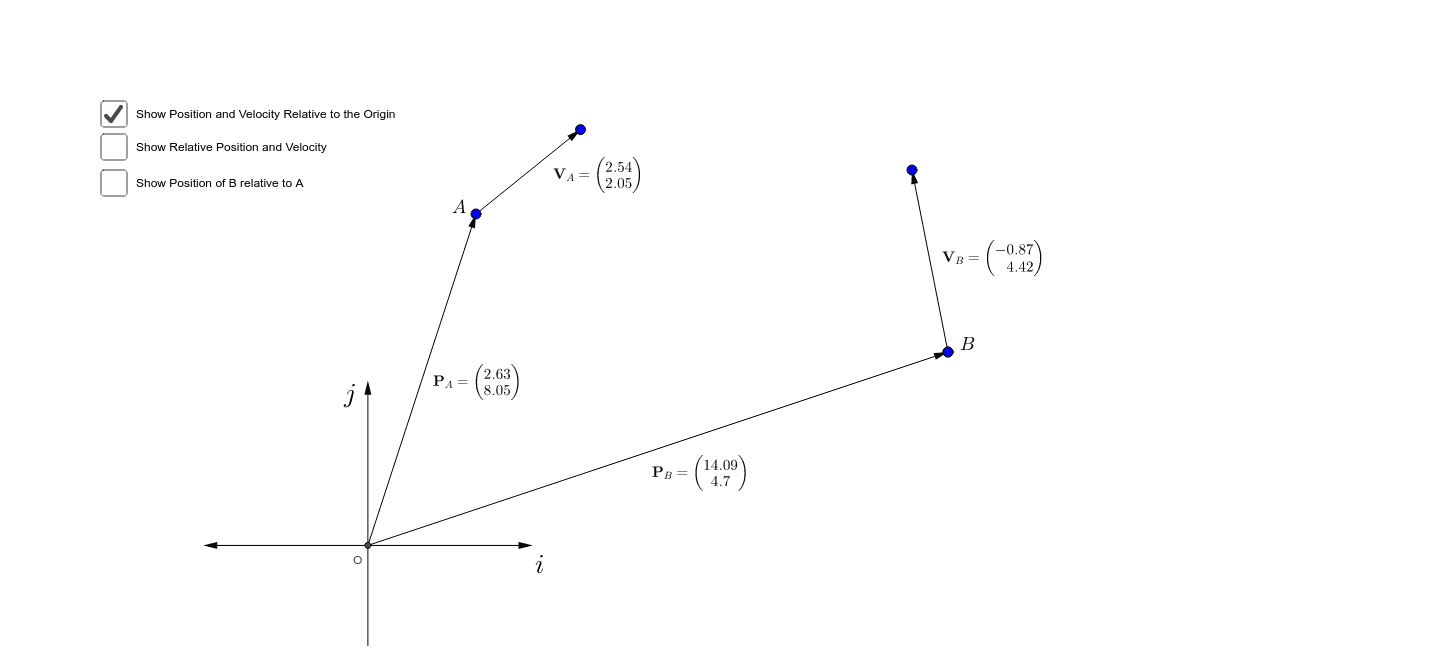
This example demonstrates how to find the shortest distance between two line segments using relative vectors. Key concepts include the dot product of vectors and the relative position of line segments. Using GeoGebra commands such as Intersect, Vector, and Midpoint, the example provides a visual and interactive way to understand vector operations and geometric constructions. Suitable for high school mathematics education, particularly in coordinate geometry and vector courses.
GeoGebra Commands & Parameters
Intersect(xAxis, yAxis) → OVector(O, A) → uVector(O, B) → vVector(A, B) → wMidpoint(B, A) → CMidpoint(O, A) → DMidpoint(O, B) → EVector(A, F) → zVector(B, G) → aMidpoint(A, F) → HMidpoint(G, B) → ITranslate(B, rv) → B'Vector(B, B') → bPoint(yAxis) → KVector(O, K) → cVector(O, L) → dVector(O, M) → ePoint(xAxis) → NVector(O, N) → fTranslate(B, Vector[(Time * b)]) → B'_1Line(B, B') → gVector(A, B'_1) → hMidpoint(A, B'_1) → PDistance(A, B'_1) → distanceAB'1Translate(B, Vector[((Time - 1) * b)]) → QAngle(A, B'_1, Q) → α
AI Drawing Prompt Reference
Draw two line segments AB and CD and find the shortest distance between them. First, find the midpoints C and D of line segments AB and CD. Then, construct vectors u, v, and w to represent line segments OA, OB, and AB. Next, translate point B and construct vector b to find the intersection point P of line segments AB and B'B. Calculate the distance of AP. Finally, adjust the time parameter to observe the change of vector b and calculate the angle α.
The prompt above was compiled from the original drawing commands and is for reference only.