
Classifying Quadrilaterals by Anthony OR 柯志明
Loading the math board and drawing, please wait…
In collections
CBSE Class VI Maths
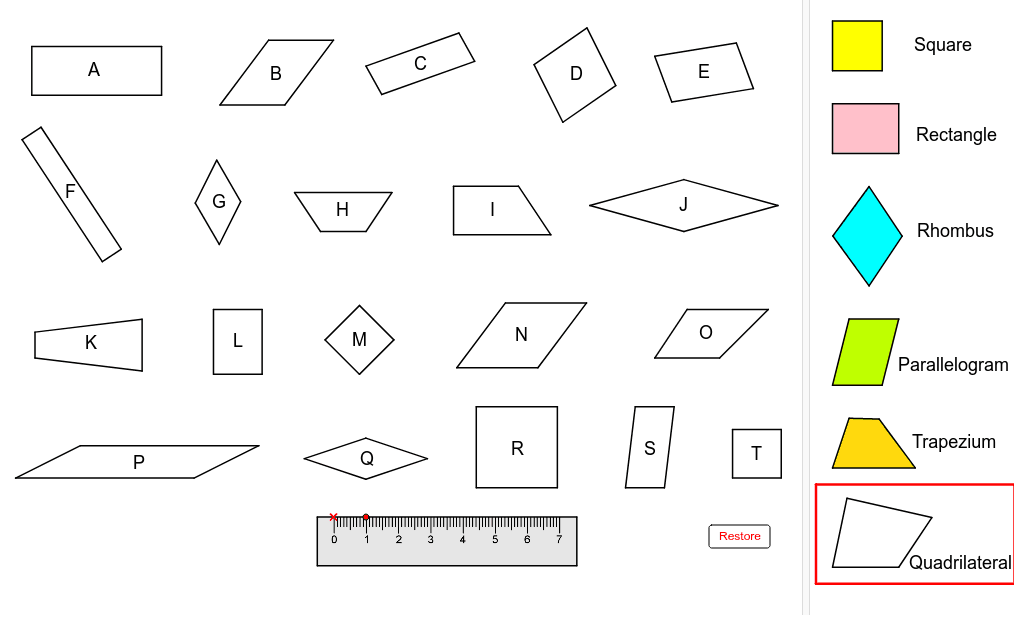
This GeoGebra example demonstrates the classification of quadrilaterals through interactive coloring, enabling students to visually identify and differentiate various quadrilateral types such as squares, rectangles, parallelograms, and trapezoids. The core mathematical concepts involved include quadrilateral geometric properties, classification criteria (e.g., side parallelism, angle characteristics), and spatial reasoning. Construction highlights: it employs Point commands to define points (e.g., A', B, C, D), Polygon commands to draw polygons (e.g., polyA, poly1, poly2), and UnitVector and UnitOrthogonalVector commands for directional assistance, creating a dynamic model. Suitable for middle or high school geometry education, ideal for classroom use or student self-study.
GeoGebra Commands & Parameters
Point(Circle[A', 4]) → BPolygon(A', B, C, D) → polyA, a_1, a_2, a_3, a_4Point(Circle[E, 0.3999999999999986]) → FPolygon(E, F, G, H) → poly2, e, f, g, hPoint(Circle[I, 0.3000000000000007]) → JPolygon(I, J, K, L) → poly1, i, j, k, lPoint(Circle[M, 0.3000000000000007]) → NPolygon(M, N, O, P) → poly4, m, n, o, pPoint(Circle[Q, 0.3605551275463988]) → RPolygon(Q, R, S, T) → poly3, q, r, s, tPoint(Circle[U, 0.5]) → VPolygon(U, V, W, Z) → poly5, u', v', w, zPoint(Circle[A'_1, 0.3999999999999986]) → B_1Polygon(A'_1, B_1, C_1, D_1) → poly6, a_5, b_5, c_5, d_5Point(Circle[E_1, 2]) → F_1Polygon(E_1, F_1, G_1, H_1) → polyB, b_1, b_2, b_3, b_4Point(Circle[I_1, 1]) → J_1Polygon(I_1, J_1, K_1, L_1) → polyC, c_1, c_2, c_3, c_4Point(Circle[M_1, 1.9849433241279208]) → N_1Polygon(M_1, N_1, O_1, P_1) → polyD, d_1, d_2, d_3, d_4Point(Circle[Q_1, 1.5]) → R_1Polygon(Q_1, R_1, S_1, T_1) → polyE, e_1, e_2, e_3, e_4Point(Circle[U_1, 4.5]) → V_1Polygon(U_1, V_1, W_1, Z_1) → polyF, f_1, f_2, f_3, f_4Point(Circle[A'_2, 1.47648230602334]) → B_2Polygon(A'_2, B_2, C_2, D_2) → polyG, g_2, g_1, g_3, g_4Point(Circle[E_2, 3]) → F_2Polygon(E_2, F_2, G_2, H_2) → polyH, h_1, h_2, h_4, h_3Point(Circle[I_2, 3]) → J_2Polygon(I_2, J_2, K_2, L_2) → polyI, i_1, i_2, i_3, i_4Point(Circle[M_2, 3.0083217912982647]) → N_2Polygon(M_2, N_2, O_2, P_2) → polyJ, j_1, j_2, j_3, j_4Point(Circle[Q_2, 1.6]) → R_2Polygon(Q_2, R_2, S_2, T_2) → polyK, k_1, k_2, k_3, k_4Point(Circle[U_2, 1.5]) → V_2Polygon(U_2, V_2, W_2, Z_2) → polyL, l_1, l_2, l_3, l_4Point(Circle[A'_3, 1.5]) → B_3Polygon(A'_3, B_3, C_3, D_3) → polyM, m_1, m_2, m_3, m_4Point(Circle[E_3, 2.5]) → F_3Polygon(E_3, F_3, G_3, H_3) → polyN, n_1, n_2, n_3, n_4Point(Circle[I_3, 2]) → J_3Polygon(I_3, J_3, K_3, L_3) → polyO, o_1, o_2, o_3, o_4Point(Circle[M_3, 5.5]) → N_3Polygon(M_3, N_3, O_3, P_3) → polyP, p_1, p_4, p_2, p_3Point(Circle[Q_3, 2]) → R_3Polygon(Q_3, R_3, S_3, T_3) → polyQ, q_1, q_2, q_3, q_4Point(Circle[U_3, 2.5]) → V_3Polygon(U_3, V_3, W_3, Z_3) → polyR, r_1, r_2, r_3, r_4Point(Circle[A'_4, 1.2]) → B_4Polygon(A'_4, B_4, C_4, D_4) → polyS, s_1, s_2, s_3, s_4Point(Circle[E_4, 1.5]) → F_4Polygon(E_4, F_4, G_4, H_4) → polyT, t_1, t_2, t_3, t_4Polygon(I_4, J_4, K_4, L_4) → poly7, i_5, j_5, k_5, l_5Polygon(I_5, J_5, K_5, L_5) → poly7_1, i_6, j_6, k_6, l_6Polygon(I_6, J_6, K_6, L_6) → poly7_2, i_7, j_7, k_7, l_7Polygon(I_7, J_7, K_7, L_7) → poly7_3, i_8, j_8, k_8, l_8Polygon(I_8, J_8, K_8, L_8) → poly7_4, i_9, j_9, k_9, l_9Polygon(I_9, J_9, K_9, L_9) → poly7_5, i_{10}, j_{10}, k_{10}, l_{10}Point(Circle[A_1, 1]) → A_6UnitVector(Segment[A_1, A_6]) → uUnitOrthogonalVector(Segment[A_1, A_6]) → vPolygon(A_1, A_2, A_3, A_4, A_5, A_6) → poly8, a_6, a_7, a_8, a_9, a_{10}, a_{11}