
Circumcircle and Quadrilateral Animation
Loading the math board and drawing, please wait…
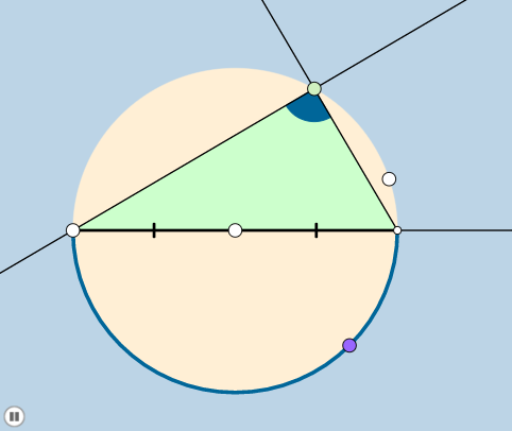
This example demonstrates the construction and properties of the circumcircle of a quadrilateral through animation. It involves core concepts like circumcircle, inscribed angle theorem, cosine rule, and quadrilateral classification. GeoGebra commands used include Circle, Point, Line, Intersect, CircleArc, Segment, Dilate, Rotate, Ray, Min, CircleSector, OrthogonalLine, Angle, Vector, Translate, Mirror, Polygon. Suitable for high school geometry education to understand the geometric relationship between quadrilaterals and circles.
GeoGebra Commands & Parameters
Circle(A, B) → cPoint(c) → CLine(C, A) → aIntersect(c, a, 2) → DCircleArc(A, C, D) → dCircleArc(A, D, C) → ePoint(e) → ESegment(C, D) → hDilate(C, If[0 < b ≤ 1, 1 - b, 0], A) → C'Segment(C, C') → iDilate(A, If[1 < b ≤ 2, 2 - b, 0], D) → A'Segment(A, A') → jRotate(C, If[2 < b ≤ 3, ((-(b - 2)) * π), (-π)], A) → C'_1Rotate(C', If[2 < b ≤ 3, ((-(b - 2)) * π), (-π)], A) → C''Segment(C'_1, C'') → i'Rotate(C, If[3 < b ≤ 4, ((b - 3) * π), π], A) → C'_2CircleArc(A, C, C'_2) → kDilate(D, If[5 < b ≤ 6, 6 - b, 0], E) → D'Segment(D, D') → fRay(D, E) → gPoint(g) → FRay(E, F) → lDilate(C, If[5 < b ≤ 6, 6 - b, 0], E) → C'_3Segment(C, C'_3) → mMin({m, f}) → nCircle(E, (0.2 * n)) → pIntersect(p, l) → G,Intersect(c, m, 1) → HIntersect(p, m) → I,CircleSector(E, G, I) → qRotate(q, If[6.5 < b ≤ 7.5, ((b - 6.5) * π / 2), π / 2], E) → q'Point(cc) → JLine(C, D) → rOrthogonalLine(J, r) → sIntersect(s, r) → KLine(C, E) → tOrthogonalLine(J, t) → f_1Intersect(t, f_1) → LLine(K, L) → g_1Line(J, E) → h_1Intersect(g_1, h_1) → MAngle(A, M, J) → αLine(A, M) → i_1Circle(C, 1) → c_1Circle(E, 1) → d_1Intersect(d_1, t, 2) → NIntersect(c_1, t, 1) → ORay(E, N) → j_1Ray(C, O) → k_1Dilate(J, If[8 < b ≤ 9, 9 - b, 0], K) → J'Segment(J, J') → l_1Dilate(E, If[9 < b ≤ 10, 10 - b, 0], K) → E'Vector(E, E') → uTranslate(q', u) → q''Line(E, r) → m_1Point(m_1) → PAngle(D, E, P) → βRotate(q'', If[10 < b ≤ 11, ((b - 10) * β), β], K) → q'''Mirror(J, r) → J'_1Dilate(K, If[9 < b ≤ 10, 10 - b, 0], J'_1) → K'Segment(K, K') → n_1Dilate(J, If[11 < b ≤ 12, 12 - b, 0], L) → J'_2Segment(J, J'_2) → p_1Dilate(E, If[12 < b ≤ 13, 13 - b, 0], L) → E'_1Vector(E, E'_1) → vTranslate(q', v) → q''_1Dilate(J, If[13 < b ≤ 14, 14 - b, 0], E) → J'_3Segment(J, J'_3) → q_1Dilate(K, If[14 < b ≤ 15, 15 - b, 0], M) → K'_1Segment(K, K'_1) → r_1Dilate(M, If[15 < b ≤ 16, 16 - b, 0], L) → M'Segment(M, M') → s_1Circle(A, 1) → e_1Circle(M, 1) → t_1Intersect(t_1, c, 1) → QIntersect(t_1, i_1) → R, SIntersect(e_1, i_1) → T, UDilate(A, If[16 < b ≤ 17, 17 - b, 0], M) → A'_1Segment(A, A'_1) → a_1Ray(M, S) → b_1Ray(A, T) → f_2Dilate(E, If[17 < b ≤ 18, 18 - b, 0], M) → E'_2Vector(E, E'_2) → wTranslate(q', w) → q''_2Line(E, f_2) → g_2Point(g_2) → VAngle(V, E, L) → δRotate(q''_2, If[18 < b ≤ 19, ((-(b - 18)) * δ), (-δ)], M) → c_2Polygon(C, D, E) → poly1, e_2, c_3, d_2CircleArc(A, E, C) → h_2CircleArc(A, D, E) → k_2CircleArc(A, C, D) → p_2Polygon(C, D, E) → poly2, e_3, c_4, d_3Circle(C, 1) → q_2Circle(D, 1) → r_2Intersect(r_2, a) → A_1, B_1Ray(D, B_1) → i_2
AI Drawing Prompt Reference
Draw a quadrilateral and demonstrate the dynamic construction of its circumcircle. Start by drawing one side of the quadrilateral and its perpendicular bisector to find the circumcenter, then draw the circumcircle. Next, show how changing the shape of the quadrilateral affects the circumcircle by rotating and scaling its vertices. Finally, add some helper lines and angle markings to illustrate the inscribed angle theorem and cosine rule.
The prompt above was compiled from the original drawing commands and is for reference only.