
Circle Limits: Exploring Conic Sections and Volume
Loading the math board and drawing, please wait…
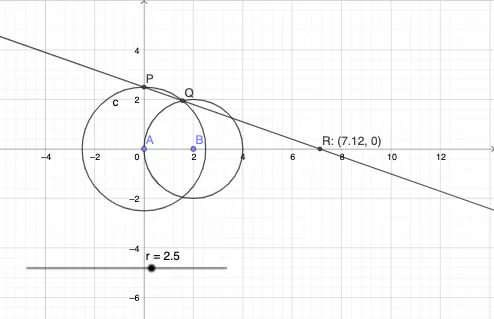
① This example dynamically demonstrates how a circle changes on a conic section, revealing the limiting relationships among its radius, intersection points, and associated volume, thereby visualizing the connection between circles and limits. ② Core mathematical concepts include circles, conic sections (ellipse, parabola, hyperbola), limits, cosine functions, and volume, with integer parameters affecting the shape. ③ Construction highlights: using GeoGebra commands Point, Circle, Intersect, and Line to create objects A, r, c, P, B, d, Q, f, and R; adjusting parameters to observe the intersection of the circle with the conic and track limiting behavior. ④ Suitable for high school to early college students, this helps understand the geometric nature of conic sections, the intuitive meaning of limits, and the relationship between volume and cross-sectional area, serving as a resource for mathematical experiments or inquiry-based learning.
GeoGebra Commands & Parameters
Point(xAxis) → ACircle(A, r) → cIntersect(c, yAxis, 2) → PPoint(xAxis) → BCircle(B, A) → dIntersect(c, d, 1) → QLine(P, Q) → fIntersect(f, xAxis) → R
AI Drawing Prompt Reference
On a coordinate plane with a horizontal axis and a vertical axis, choose a first point on the horizontal axis as the first center and set an adjustable radius, drawing a circle. Intersect this circle with the vertical axis to obtain an intersection point P. Choose a second point on the horizontal axis as another center and draw a second circle using the distance between this point and the first center. Intersect the two circles to obtain another intersection point Q. Draw the line through P and Q, then find its intersection with the horizontal axis to get point R. Keep the circles, their intersection points P and Q, and the line and point R visible so the construction can be explored by changing the parameters.
The prompt above was compiled from the original drawing commands and is for reference only.