
Circle Equation: Quick Refresher
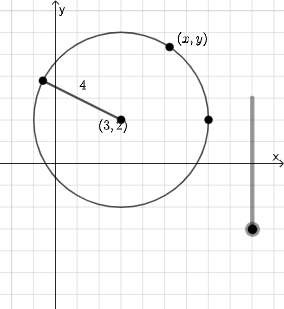
Loading the math board and drawing, please wait…
This example demonstrates how to draw a circle using coordinate geometry and shows the relationship between the circle's center, radius, and equation. Key mathematical concepts include the standard equation of a circle, calculation of the center coordinates, and solving for intersection points with lines. Construction involves GeoGebra commands like Circle, Point, Intersect, and Distance to create the circle, determine the center, calculate the radius, and verify the equation. Suitable for high school students learning coordinate geometry or for geometric construction practice and equation verification.
GeoGebra Commands & Parameters
Circle(B, A) → cPoint(c) → CIntersect(eq1, f) → DPolygon(B, D, C) → t1, c_1, b, dAngle(C, D, B) → αDilate(B, If[0 < a ≤ 1, 1 - a, 0], D) → B'Segment(B, B') → gDilate(D, If[1 < a ≤ 2, 2 - a, 0], C) → D'Segment(D, D') → mRotateText(text2, pi / 2) → text3Distance(B, A) → oDilate(C, If[2 < a ≤ 3, 3 - a, 0], B) → C'Segment(C, C') → pAngle(D, B, C) → βPoint(c) → ESegment(B, E) → qSurdText(Distance[A, B]) → text6RotateText(text7, β) → text5Circle(B_{1}, A_{1}) → c_{2}Distance(B_{1}, A_{1}) → o_{1}
AI Drawing Prompt Reference
Draw a circle in a coordinate system with center at point B and radius equal to the distance from point A to B. Pick two points C and E on the circle and connect them to the center B to form two radii. Draw a line intersecting the circle, with intersection point D. Create a triangle with vertices B, D, and C. Label the angle at vertex D as α and the angle at vertex B as β. Use a slider to control parameter a ranging from 0 to 3, and perform dilation transformations on points B, D, and C based on different values of a to obtain points B', D', and C', connecting them with segments BB', DD', and CC'. Display the distance BA numerically and rotate the corresponding text by angle β.
The prompt above was compiled from the original drawing commands and is for reference only.