
Circle Equation Demonstration
Loading the math board and drawing, please wait…
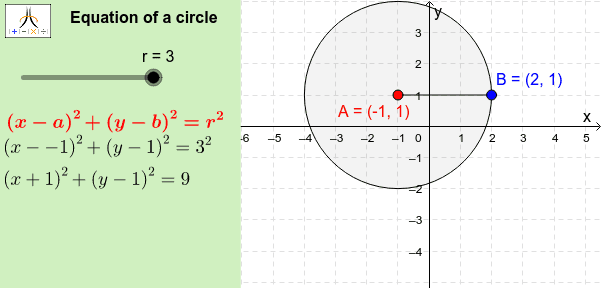
This example dynamically illustrates the equation of a circle centered at (a:b) with radius r. It covers core math concepts like the standard equation of a circle, coordinate geometry, and graphical representation in a coordinate system. Construction highlights include using commands like Circle, Point, Segment, Corner, and Polygon in GeoGebra. Suitable for high school students learning about circle equations and their geometric interpretations.
GeoGebra Commands & Parameters
Circle(A, r) → CircPoint(Circ) → BSegment(A, B) → cCorner(1, 1) → Cnr1Corner(1, 2) → Cnr2Corner(1, 3) → Cnr3Corner(1, 4) → Cnr4Polygon(CN1, CN2, CN3, CN4) → Panel, cn1, cn2, cn3, cn4
AI Drawing Prompt Reference
Draw a circle centered at (a, b) with radius r in a coordinate system, showing its standard equation. Connect the center to a point on the circle to form a diameter. Highlight key points on the axes and use a polygon to emphasize the four corner points on the axes, demonstrating fundamental concepts of coordinate geometry.
The prompt above was compiled from the original drawing commands and is for reference only.