
Circle Equation Analysis and Exploration
Loading the math board and drawing, please wait…
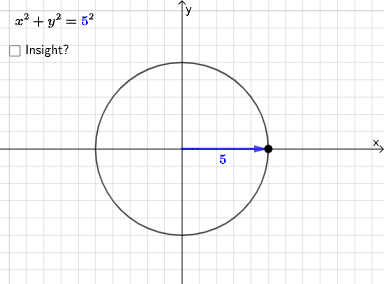
This example dynamically demonstrates the equation of a circle to help students understand its basic properties and equation forms. Key mathematical concepts include the circle equation, coordinate geometry, and quadratic equations. Using GeoGebra commands such as Point, Line, and Circle, students can explore the relationship between the circle's center, radius, and its equation.
GeoGebra Commands & Parameters
Point(Segment[(h + 1, y(C) + 10), (h + 1, y(C) - 10)]) → DLine(A, B) → fVector(A, C) → uPolygon(A, C, B) → t1, b, a_1, cSegment(A, C) → h_{1}Vector((h, 0), A) → wVector((0, 0), (h, 0)) → jPoint(Ray[A + (1, 0), A + (2, 0)]) → ECircle(A, E) → pDistance(A, E) → nVector(A, E) → vPoint(p) → FIntersect(eq1, q) → GPolygon(A, G, F) → t2, f_1, a_2, g_1Segment(F, A) → rSegment(A, G) → sSegment(G, F) → tAngle(A, G, F) → αRotateText(text18, pi / 2) → text20RotateText(text19, pi / 2) → text21
AI Drawing Prompt Reference
Draw a dynamic graph that demonstrates the equation of a circle. The graph should include a circle whose center and radius can be adjusted. The equation should relate to coordinate geometry and quadratic equations. The construction order should start by defining the center and radius, then drawing the circle, and finally showing the relationships between the center, radius, and equation.
The prompt above was compiled from the original drawing commands and is for reference only.