
Circle Area Puzzle
Loading the math board and drawing, please wait…
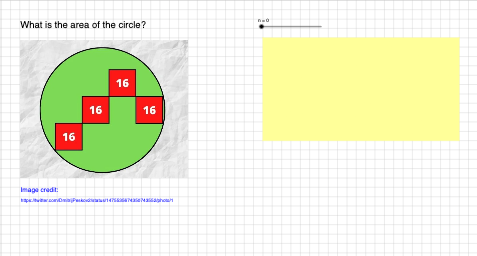
This example demonstrates how to dynamically construct and reveal the formula for the area of a circle. It involves core mathematical concepts such as circle, area, integers, normal distribution, symmetry, linear regression, and general quadrilateral. Construction highlights include using commands like Polygon and Circle, with objects like A, B₁, poly1, f, g, h, i, C₁, D, E, poly2, j, k, l, m, F, G, H, poly3, n₂, p, q, r, I, J, B, poly4, s, t, a, b, L, C, c, text1, text1₁, text1₂, text1₃, text1₄, n. Suitable for high school mathematics teaching to explore and validate the area calculation method of circles.
GeoGebra Commands & Parameters
Polygon(A, B_{1}, 4) → poly1, f, g, h, i, C_{1}, DPolygon(C_{1}, E, 4) → poly2, j, k, l, m, F, GPolygon(F, H, 4) → poly3, n_{2}, p, q, r, I, JPolygon(B, H, 4) → poly4, s, t, a, b, L, CCircle(A, B, C) → cPolygon(N, O, P, Q) → q1, n_1, o, p_1, q_1
AI Drawing Prompt Reference
Create a geometry construction diagram: use key points A, B, and related points such as B₁, C₁, D, E, F, G, H, and additional intermediate points connected to them to form several quadrilateral pieces arranged in a chain around the same region. First construct one quadrilateral using A and B₁, then build further quadrilaterals continuing through the points C₁–E and through the blocks involving F, G, and H so the pieces fit together. Next define a circle using points A, B, and C, and show how the circle relates to those quadrilateral partitions. Finish by adding another quadrilateral formed by four points for comparison and emphasis.
The prompt above was compiled from the original drawing commands and is for reference only.