
Characteristics of Conic Sections
Loading the math board and drawing, please wait…
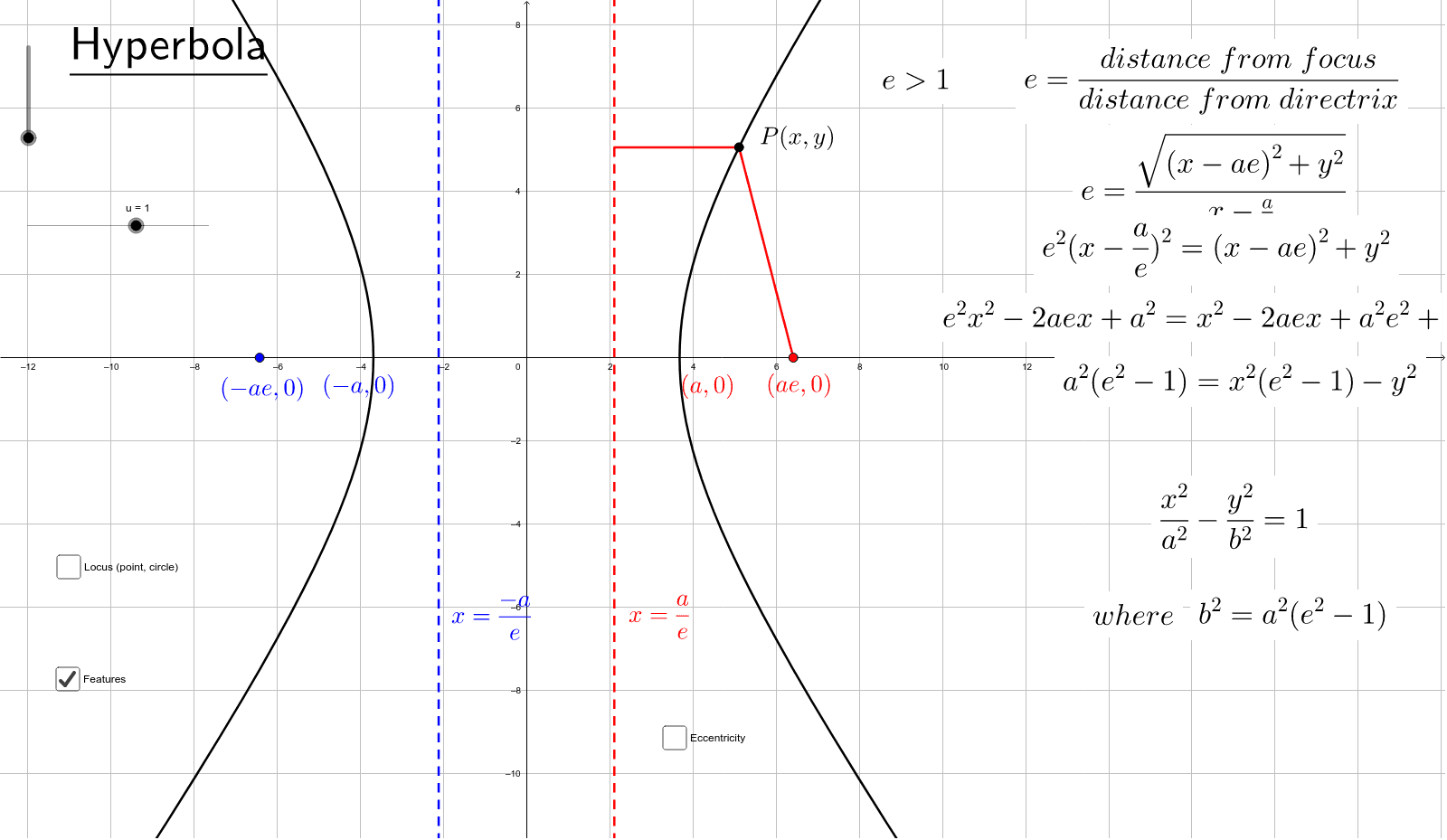
This GeoGebra example demonstrates the defining characteristics of conic sections—circle, ellipse, hyperbola, and parabola—and their interrelations, designed with the Edexcel FP1/FP3 syllabus in mind. It visually explores the focus-directrix definition, eccentricity, and the unified view of conics as plane sections of a cone. The construction employs commands such as Intersect, Point, LineBisector, Segment, OrthogonalLine, Circle, Ellipse, Eccentricity, and Hyperbola, creating objects like focus F, directrix D, vertices A/B, and a moving point P. Interactive buttons allow switching between different conic types, making it ideal for advanced high school or pre-university students studying coordinate geometry and conic sections. It helps learners grasp how eccentricity determines the curve type and how the focus-directrix property unifies all conics.
GeoGebra Commands & Parameters
Intersect(xAxis, yAxis) → DPoint(b_1) → BLineBisector(A, B) → cPoint(d) → PSegment(A, P) → eOrthogonalLine(P, b_1) → fIntersect(b_1, f) → CSegment(C, P) → gCircle(D, x(F) + 2) → pPoint(p) → GLineBisector(G, F) → mPoint(yAxis) → HEllipse(F, J, I) → qPoint(q) → KSegment(J, K) → nSegment(K, F) → rEccentricity(q) → eccentricityIntersect(q, xAxis, 2) → LIntersect(q, xAxis, 1) → MIntersect(c_1, xAxis) → NIntersect(d_1, xAxis) → OPoint(q) → QSegment(Q, J) → e_1Segment(Q, F) → f_1OrthogonalLine(Q, d_1) → g_1Intersect(d_1, g_1) → RSegment(R, Q) → h_1OrthogonalLine(Q, c_1) → i_1Intersect(c_1, i_1) → SSegment(Q, S) → j_1Intersect(q, yAxis, 2) → TIntersect(q, yAxis, 1) → UIntersect(xAxis, yAxis) → VPoint(yAxis) → WCircle(V, W) → p_1Point(xAxis) → ZPoint(p_1) → A_1LineBisector(Z, A_1) → m_1Hyperbola(B_1, Z, C_1) → q_1Eccentricity(q_1) → eccentricity1Hyperbola(Z, B_1, D_1) → r_1Eccentricity(r_1) → s_1Intersect(a_2, xAxis) → E_1Intersect(t_1, xAxis) → F_1Intersect(r_1, xAxis, 1) → G_1Intersect(r_1, xAxis, 2) → H_1Eccentricity(r_1) → v_1Point(r_1) → I_1OrthogonalLine(I_1, t_1) → c_2Intersect(t_1, c_2) → J_1Segment(J_1, I_1) → d_2Segment(I_1, Z) → e_2
AI Drawing Prompt Reference
Draw a diagram showing the characteristics of conic sections including circle, ellipse, hyperbola, and parabola, highlighting their focus, directrix, and vertices. Use a slider to adjust parameters, demonstrating how plane sections of a cone correspond to different conics. Label the focus-directrix distance and eccentricity, illustrating how eccentricity determines the curve type. Start by plotting the intersection of axes as the directrix, then construct the cone sections through the focus and vertices, and finally use a moving point to visualize the focus-directrix definition, with eccentricity clearly marked.
The prompt above was compiled from the original drawing commands and is for reference only.