
Centroid of Composite Area - Shape with Hole
Loading the math board and drawing, please wait…
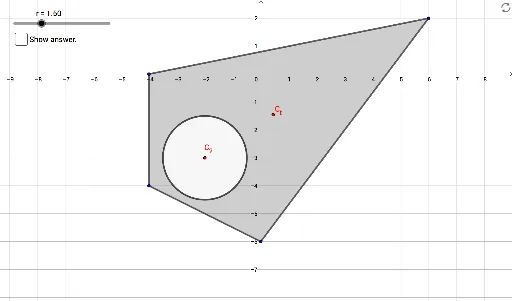
This example demonstrates how to calculate the centroid of a composite area with a hole by dividing and combining shapes. Key math concepts include area calculation, coordinate geometry, and centroid formulas. GeoGebra commands and objects used are Polygon, Sequence, Intersect, PointIn, Circle, and Centroid to construct boundary points and divide regions for precise centroid calculation. Suitable for high school and above students to learn about centroid computation in composite shapes.
GeoGebra Commands & Parameters
Polygon(P_1, P_2, P_3, P_4) → A_1, a, b, c, dSequence(Angle[P(i), P(i + 1), P(i + 2)], i, 1, 4) → αSequence(r / sin(α(i) / 2), i, 1, 4) → LSequence(AngularBisector[P(i), P(i + 1), P(i + 2)], i, 1, 4) → bisectorsSequence(Circle[P(i), L(i - 1)], i, 2, 5) → circlesIntersect(circles(1), bisectors(1)) → A, BIntersect(circles(2), bisectors(2)) → C, DIntersect(circles(3), bisectors(3)) → E, FIntersect(circles(4), bisectors(4)) → G, HPolygon(D, B, H, F) → q2, d_1, b_1, h, fPointIn(q2) → C_2Circle(C_2, r) → eCircle(C_2, r) → e'Centroid(A_1) → C_1
AI Drawing Prompt Reference
Draw a composite area with a hole by first creating a quadrilateral, then calculating angles and radii to draw four circles centered at the vertices of the quadrilateral. Find the intersections of these circles with the angle bisectors of adjacent vertices, connect these intersections to form two quadrilaterals, one nested within the other. Finally, calculate the centroid of the outer quadrilateral and mark one vertex of the inner quadrilateral along with its corresponding circle.
The prompt above was compiled from the original drawing commands and is for reference only.