
Center of Mass of a System of Point Masses
Loading the math board and drawing, please wait…
In collections
Besondere Punkte/Special Points
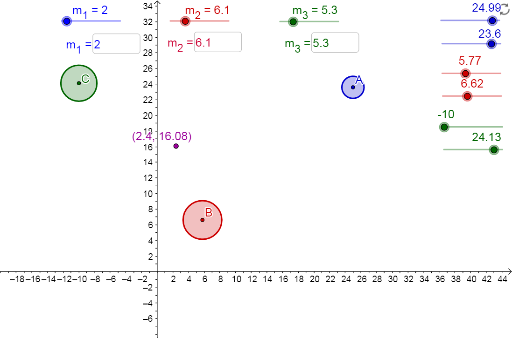
This example demonstrates the dynamically changing location of the center of mass when point masses change in mass or location. Key mathematical concepts include the calculation of the center of mass. Using GeoGebra commands such as Circle and Textfield, students can visually understand the concept of the center of mass. Suitable for high school physics and mathematics education.
GeoGebra Commands & Parameters
Circle((a_1, a_2), m_1^(0.5)) → cCircle((b_1, b_2), m_2^(0.5)) → dCircle((c_1, c_2), m_3^(0.5)) → eTextfield(b_1) → inputBox1Textfield(b_2) → inputBox2Textfield(a_1) → inputBox3Textfield(a_2) → inputBox4Textfield(c_1) → inputBox5Textfield(c_2) → inputBox6Textfield(m_1) → inputBox7Textfield(m_2) → inputBox8Textfield(m_3) → inputBox9
AI Drawing Prompt Reference
Draw three circles representing point masses with sizes proportional to their masses. Label the coordinates and mass values of each point mass in a coordinate system. Calculate and display the center of mass of the system. Use sliders to dynamically change the positions and masses of the point masses and observe the resulting changes in the center of mass position to illustrate the concept.
The prompt above was compiled from the original drawing commands and is for reference only.