
Center of Gravity (1): Midpoint and Intersection Construction
Loading the math board and drawing, please wait…
In collections
geometriadinamica.es
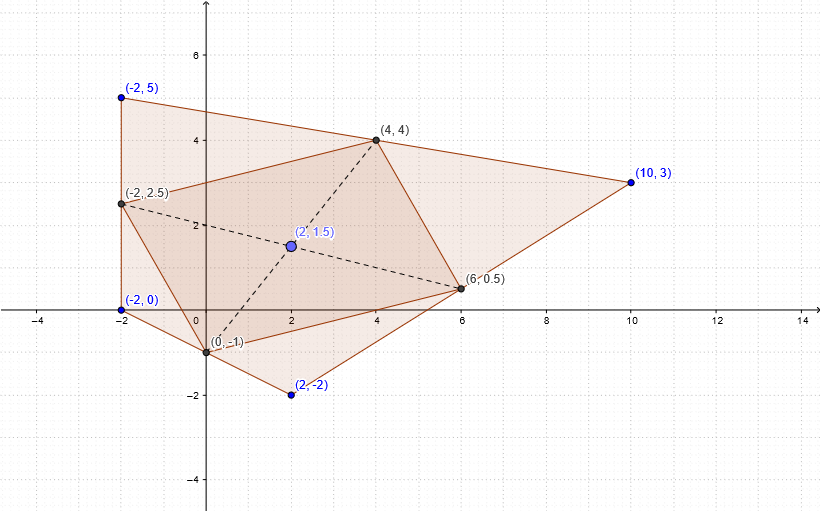
This example demonstrates how to locate center-of-gravity related points for a polygonal figure using midpoint-based constructions and line intersections. The key mathematical ideas include midpoints, segments, polygonal composition, and the use of intersection points to determine characteristic locations that reflect the “average position”/centroid construction. Construction-wise, it uses GeoGebra’s Polygon to build two polygons (poly1, poly2) from given vertices (e.g., A, B, C, D and similar points); Midpoint to compute the midpoints of selected edges/segments; Segment to draw connecting lines between these midpoints (objects a–d, e–h, i–j, etc.); and Intersect to compute where these constructed segments meet (points such as E, F, G, H and related intersection points including I). Suitable for secondary school through pre-college geometry, and useful for teaching geometric construction methods and centroid intuition via visualization.
GeoGebra Commands & Parameters
Polygon(A, B, C, D) → poly1, a, b, c, dMidpoint(d) → EMidpoint(c) → FMidpoint(b) → GMidpoint(a) → HPolygon(E, F, G, H) → poly2, e, f, g, hSegment(H, F) → iSegment(E, G) → jIntersect(i, j) → I
AI Drawing Prompt Reference
Draw a center of gravity diagram for a polygon, including two polygons, multiple midpoints, connecting lines, and intersection points. First, draw two polygons composed of four vertices each. Then, calculate the midpoints of each edge and connect these midpoints to form new line segments. Finally, calculate the intersection points of these line segments to obtain the key points of the center of gravity diagram.
The prompt above was compiled from the original drawing commands and is for reference only.