
Center of Dilation Demo by Sarah Clement
Loading the math board and drawing, please wait…
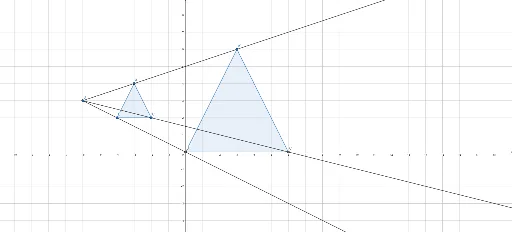
This example demonstrates the effect of dilation transformation on a cuboid, illustrating the role of the center of dilation. It involves core math concepts like dilation, central symmetry, and solid geometry. Construction highlights include commands like Polygon, Ray, Point, and Intersect from GeoGebra, focusing on geometric construction. Suitable for high school students learning solid geometry and transformations, helping them understand the properties and applications of dilation.
GeoGebra Commands & Parameters
Polygon(A, B, C) → t1, c, a, bRay(D, A) → fRay(D, B) → gRay(D, C) → hPoint(f) → A'Intersect(g, xAxis) → B'Intersect(h, xAxis) → C'Polygon(A', B', C') → t2, g_1, e, f_1
AI Drawing Prompt Reference
Draw a 3D coordinate system. First construct a triangle as the base. Then pick a point outside the triangle as the dilation center. From this center, draw rays to each of the triangle's three vertices. On each ray, place a new point: one point lies between the center and a vertex, while the other two points are where the rays intersect the x-axis. Connect these three new points to form a second triangle, which is the dilated image of the original triangle with respect to the center. Show how the dilation transformation affects the solid shape, emphasizing the role of the center.
The prompt above was compiled from the original drawing commands and is for reference only.