
Cash Register Change via Random Polygon Construction: Conditional Probability &
Loading the math board and drawing, please wait…
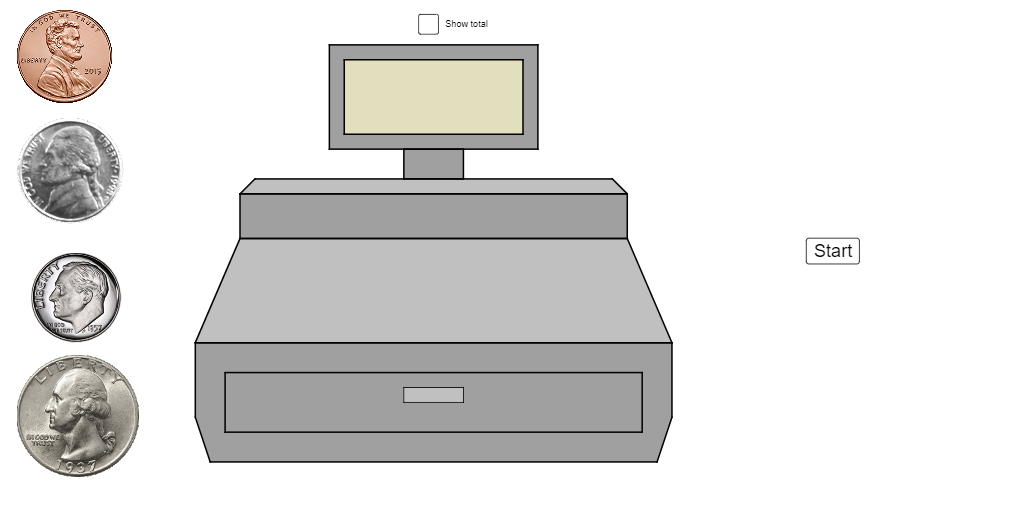
This example models a “cash register” change-making process using randomized geometric construction. It demonstrates how coin/amount outcomes vary under constraints, and how visual regions and intersection points can represent feasible change configurations. The key mathematical ideas include conditional probability (counting outcomes that satisfy given change/amount conditions), limits and interest calculation (tracking how computed quantities evolve over steps or iterations), and a secant/intersection viewpoint implemented through intersection-driven geometry. In GeoGebra, the construction is built with Point to define anchor centers (e.g., pennycenter), Polygon to form region shapes, Shuffle together with Random and RandomElement to randomize choices or ordering, Intersect to compute intersection points that drive the logic, and If to filter or classify configurations based on conditional rules. Element is used to reference randomly selected objects for consistent downstream computation. Named objects such as A, B, C… along with indexed points (e.g., I_4, Z_3, W_3) and groups like R_i, S_i are used to encode layers of coin-size/quantity and to produce the dynamic “register” visualization. Suitable for high school to early university audiences in math visualization, probabilistic modeling, and geometry-based interactive demonstrations.
GeoGebra Commands & Parameters
Point(xAxis) → C_4pennycenter(R_{11}, pennysize) → Tpennycenter(R_{13}, pennysize) → Upennycenter(R_{14}, pennysize) → Vpennycenter(R_{15}, pennysize) → Wpennycenter(R_{16}, pennysize) → Zpennycenter(R_{10}, pennysize) → A_1pennycenter(R_{17}, pennysize) → B_1pennycenter(R_{18}, pennysize) → C_1pennycenter(R_{19}, pennysize) → D_1pennycenter(R_1, pennysize) → E_1pennycenter(R_2, pennysize) → F_1pennycenter(R_3, pennysize) → G_1pennycenter(R_4, pennysize) → H_1pennycenter(R_5, pennysize) → I_1pennycenter(R_6, pennysize) → J_1pennycenter(R_7, pennysize) → K_1pennycenter(R_8, pennysize) → L_1pennycenter(R_9, pennysize) → M_1pennycenter(R_{12}, pennysize) → N_1pennycenter(O_1, nickelsize) → Q_1pennycenter(O_2, nickelsize) → T_1pennycenter(O_3, nickelsize) → U_1pennycenter(O_4, nickelsize) → V_1pennycenter(O_5, nickelsize) → W_1pennycenter(O_6, nickelsize) → Z_1pennycenter(O_7, nickelsize) → A_2pennycenter(O_8, nickelsize) → B_2pennycenter(O_9, nickelsize) → C_2pennycenter(O_{10}, nickelsize) → D_2pennycenter(O_{11}, nickelsize) → E_2pennycenter(O_{12}, nickelsize) → F_2pennycenter(O_{13}, nickelsize) → G_2pennycenter(O_{14}, nickelsize) → H_2pennycenter(O_{15}, nickelsize) → I_2pennycenter(O_{16}, nickelsize) → J_2pennycenter(O_{17}, nickelsize) → K_2pennycenter(O_{18}, nickelsize) → L_2pennycenter(O_{19}, nickelsize) → M_2pennycenter(O_{20}, nickelsize) → N_2Polygon(J_3, K_3, C_4, D_4, E_4, F_4, G_4, I_3, L_3, M_3, A, V_3, W_3, Z_3, A_4, B_4) → poly4, h, r, s, t, f_1, g_1, h_1, i_1, i, j, k, l, m, n, p, qpennycenter(E_6, dimesize) → D_6pennycenter(E_7, dimesize) → F_6pennycenter(E_8, dimesize) → G_6pennycenter(E_9, dimesize) → H_6pennycenter(E_{10}, dimesize) → I_6pennycenter(E_{11}, dimesize) → J_6pennycenter(E_{12}, dimesize) → K_6pennycenter(E_{13}, dimesize) → L_6pennycenter(E_{14}, dimesize) → M_6pennycenter(E_{15}, dimesize) → N_6pennycenter(E_{16}, dimesize) → Q_6pennycenter(E_{17}, dimesize) → T_6pennycenter(E_{18}, dimesize) → U_6pennycenter(E_{19}, dimesize) → V_6pennycenter(E_{21}, dimesize) → W_6pennycenter(E_{22}, dimesize) → Z_6pennycenter(E_{23}, dimesize) → A_7pennycenter(E_{24}, dimesize) → B_7pennycenter(E, dimesize) → D_7pennycenter(E_{20}, dimesize) → F_7pennycenter(G_7, quartersize) → I_7pennycenter(G_{10}, quartersize) → J_7pennycenter(G_9, quartersize) → K_7pennycenter(G_8, quartersize) → L_7pennycenter(G_{14}, quartersize) → M_7pennycenter(G_{13}, quartersize) → N_7pennycenter(G_{12}, quartersize) → Q_7pennycenter(G_{11}, quartersize) → T_7pennycenter(G_{18}, quartersize) → U_7pennycenter(G_{17}, quartersize) → V_7pennycenter(G_{16}, quartersize) → W_7pennycenter(G_{15}, quartersize) → Z_7pennycenter(G_{19}, quartersize) → A_8pennycenter(G_{20}, quartersize) → B_8pennycenter(G_{21}, quartersize) → D_8pennycenter(G_{22}, quartersize) → F_8pennycenter(G_{23}, quartersize) → I_8pennycenter(G_{24}, quartersize) → J_8pennycenter(G_{25}, quartersize) → K_8pennycenter(G_{26}, quartersize) → L_8Shuffle(Remove[Flatten[Sequence[Sequence[Point[{i, j}], i, -32, -22, 3], j, 8, 0, -3]], {(-32, 8), (-23, 2)}]) → leftbanklist, {(-29, 5), (-29, 2), (-32, 5), (-26, 8), (-23, 8), (-32, 2), (-26, 5), (-23, 5), (-29, 8), (-26, 2)}Polygon(C_4, B_4, A_4, Z_3, E_4, D_4) → poly1, c_4, b_4, a_4, z_3, e_4, d_4Polygon(B, C, D, F) → poly2, b_1, c_1, d_1, f_2Intersect(z_3, e_4) → JPolygon(J, F_4, W_3, Z_3) → poly3, j_2, f_4, w_3, z_1Polygon(F_4, G_4, V_3, W_3) → poly5, f_3, g_4, v_3, w_1Polygon(G_4, I_3, A, V_3) → poly6, g_2, i_3, a_1, v_1Polygon(H_4, I_4, N_3, U_3) → poly7, h_4, i_4, n_3, u_3Polygon(J_3, K_3, L_3, M_3) → poly8, j_3, k_3, l_3, m_3Polygon(K, L, M, N) → poly9, k_2, l_2, m_2, n_1Polygon(O, P, Q, Q_2) → poly10, o, p_1, q_1, q_2RandomElement({"gum", "yo-yo", "bottle of bubbles", "top", "candy", "lollipop", "pencil"}) → buying, "top"Element({"1¢", "10¢", "20¢", "50¢", "$1.00"}, u) → maxTextRandom(Element[{1, 10, 20, 50, 100}, u - 1], Element[{1, 10, 20, 50, 100}, u]) → costIf(cost ≟ 100, "$1.00", Text[cost] + "¢") → costTextIf(Rtotal ≟ 0, "0¢", If[Rtotal < 100, Rtotal + "¢", "$" + Rhundreds + "." + Rtens + Rones]) → text2If(cost ≟ Rtotal, "You bought it!", If[cost > Rtotal, "You haven't paid enough.", "You paid too much."]) → checkText
AI Drawing Prompt Reference
Draw a planar “cash register change configuration” built from coin-sized anchor centers. First place several penny-sized center positions and, separately, penny/nickel-sized and dime-sized center positions around them, all in the same coordinate plane. Use selected penny-related center points as vertices to form a single complex polygonal outline that covers the feasible region; include additional penny-related centers as more polygon vertices so the shape extends across the lower and left/right directions. The key visual relationships are that each anchor center serves as a polygon vertex or boundary location, creating a region whose geometry is determined by those coin-size centers.
The prompt above was compiled from the original drawing commands and is for reference only.