
Calculus - Ring of Spheres
Loading the math board and drawing, please wait…
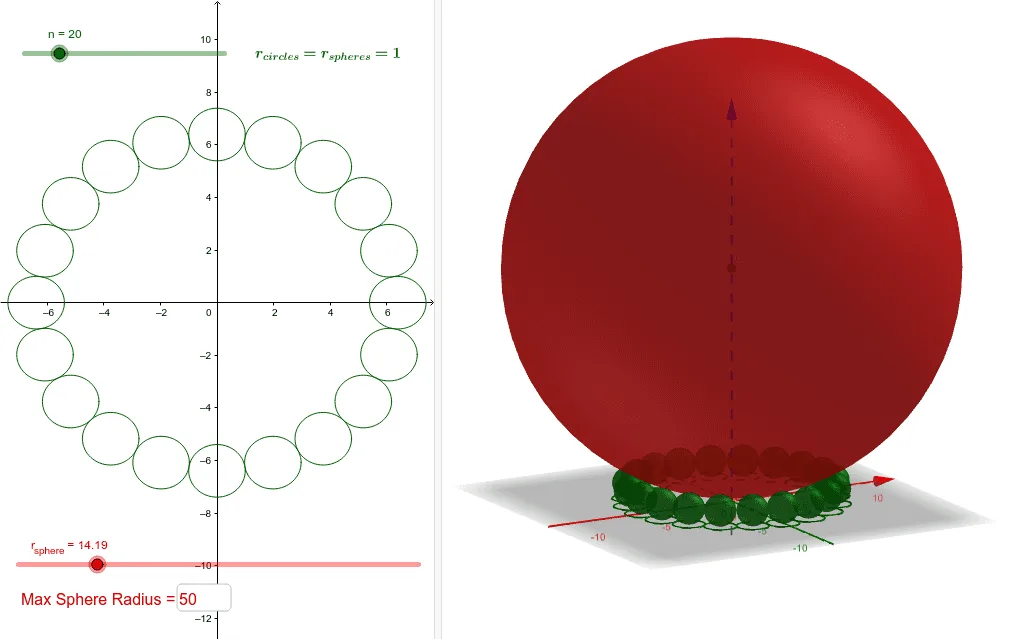
This example demonstrates the geometric phenomenon of generating a torus (ring of spheres) through the rotation of a sphere. Core mathematical concepts include calculus-based solids of revolution, spheres, secant lines, and fractal geometry. Construction highlights the use of GeoGebra commands like Sequence for sphere generation, Textfield for annotations, and objects such as list1-list4, r_{sphere}, C, a, max for parameter control and dynamic visualization. Suitable for high school and above learning solid geometry, calculus, and rotation solids.
GeoGebra Commands & Parameters
Sequence(Rotate[A, ((2 * π / n) * i), (0, 0)], i, 0, n - 1) → list1Sequence(Circle[Element[list1, i], 1], i, 0, n) → list2Sequence((x(Element[list1, i]), y(Element[list1, i]), 1), i, 1, n) → list3Sequence(Sphere[Element[list3, i], 1], i, 0, n) → list4Sphere(C, r_{sphere}) → aTextfield(max) → InputBox1
AI Drawing Prompt Reference
Create a torus by rotating a sphere around an axis, demonstrating how the distance and radius of the sphere affect the generated shape. First, draw a sphere, then rotate it around a fixed axis to generate a series of spheres with their centers along the rotation path. Next, draw small circles with radius 1 centered at these sphere centers, and extend them upward by one unit to form a series of small spheres. Finally, combine these small spheres with the original sphere to visualize the entire torus structure.
The prompt above was compiled from the original drawing commands and is for reference only.