
Calculating Volume of Composite Solids
Loading the math board and drawing, please wait…
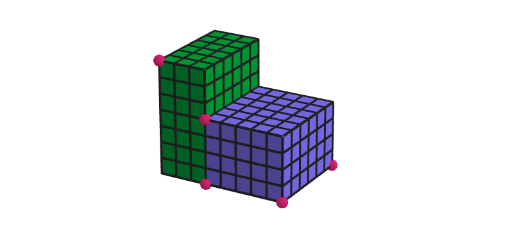
This example demonstrates how to calculate the volume of a composite solid formed by two rectangular prisms. Key mathematical concepts include volume computation, geometric transformations, and spatial relationships. Construction involves using GeoGebra commands like Point, Sequence, Prism, Translate to build prism models and observe volume changes by adjusting dimensions and orientations. Suitable for elementary school students (grades 4-5) to develop spatial reasoning and volume calculation skills.
GeoGebra Commands & Parameters
Point(Segment[A_{1} + (2, 0, 0), A_{1} + (8, 0, 0)]) → ED_{1}Sequence(Translate[A_{1}, Vector[(ii, 0, 0)]], ii, 1, x(ED_{1}) + 4 - 1) → l5Point(Segment[ED_{1} + (0, 1, 0), ED_{1} + (0, 8, 0)]) → FD_{1}Point(l5) → CD_{1}Point(Segment[A_{1} + (0, 0, 1), A_{1} + (0, 0, 8)]) → GD_{1}Zip((x(CD_{1}), y(CD_{1}), kk), kk, Sequence[1, 8]) → l4Point(l4) → ID_{1}Polygon({A_{1}, B_{1}, DD_{1}, CD_{1}}) → base1_{1}Polygon({CD_{1}, ED_{1}, FD_{1}, DD_{1}}) → base2_{1}Prism(base1_{1}, GD_{1}) → prism1, K_{1}, edge2_{1}, edge3_{1}, edge4_{1}, edgeGDK_{1}, edgeKL_{1}, edgeLM_{1}, edgeGDM_{1}, L_{1}, M_{1}, face1_{1}, face3_{1}, face4_{1}, face2_{1}, faceGDKLM_{1}, edge1_{1}Prism(base2_{1}, ID_{1}) → prism2, N_{1}, edge6_{1}, edge7_{1}, edge8_{1}, edgeIDN_{1}, edgeNO_{1}, edgeOP_{1}, edgeIDP_{1}, O_{1}, P_{1}, face5_{1}, face7_{1}, face8_{1}, face6_{1}, faceIDNOP_{1}, edge5_{1}Polygon({A_{1}, ED_{1}, FD_{1}, B_{1}}) → base3_{1}Prism(base3_{1}, If[z(GD_{1}) ≤ z(ID_{1}), z(GD_{1}), z(ID_{1})]) → prism3, Q_{1}, edge9_{1}, edge10_{1}, edge11_{1}, edge12_{1}, edgeQR_{1}, edgeRS_{1}, edgeST_{1}, edgeQT_{1}, R_{1}, S_{1}, T_{1}, face9_{1}, face11_{1}, face12_{1}, face10_{1}, faceQRST_{1}If(z(ID_{1}) ≥ z(GD_{1}), Prism[Translate[Polygon[{CD_{1}, ED_{1}, FD_{1}, DD_{1}}], Vector[A_{1}, GD_{1}]], ID_{1}], Prism[Translate[Polygon[{A_{1}, CD_{1}, DD_{1}, B_{1}}], Vector[CD_{1}, ID_{1}]], GD_{1}]) → prism4Sequence(Translate[A_{1}, Vector[(jj, 0, 0)]], jj, 0, x(CD_{1}) - x(A_{1})) → l1Translate(l1, Vector[A_{1}, B_{1}]) → l1'Translate(l1, Vector[A_{1}, GD_{1}]) → l1'_{1}Zip(Segment[AA, BB], AA, l1, BB, l1') → squaresBase1Translate(squaresBase1, Vector[A_{1}, GD_{1}]) → squaresBase1'Zip(Segment[AA, BB], AA, l1, BB, l1'_{1}) → squaresFront1Translate(squaresFront1, Vector[A_{1}, B_{1}]) → squaresFront1'Sequence(Translate[A_{1}, Vector[(0, jj, 0)]], jj, 0, y(B_{1}) - y(A_{1})) → l2Translate(l2, Vector[A_{1}, GD_{1}]) → l2'Sequence(Translate[A_{1}, Vector[(0, 0, jj)]], jj, 0, z(GD_{1}) - z(A_{1})) → l3Translate(l3, Vector[A_{1}, B_{1}]) → l3'Zip(Segment[AA, BB], AA, l3, BB, l3') → squaresLeft1Zip(Segment[AA, BB], AA, l2, BB, l2') → squaresLeft2Translate(squaresLeft1, Vector[A_{1}, CD_{1}]) → squaresLeft1'Translate(squaresLeft2, Vector[A_{1}, CD_{1}]) → squaresLeft2'Translate(l3, Vector[A_{1}, CD_{1}]) → l3'_{1}Zip(Segment[AA, BB], AA, l3, BB, l3'_{1}) → squaresBackTranslate(squaresBack, Vector[A_{1}, B_{1}]) → squaresBack'Translate(l2', Vector[A_{1}, CD_{1}]) → l2''Zip(Segment[AA, BB], AA, l2', BB, l2'') → squaresBottomTranslate(squaresBottom, Vector[GD_{1}, A_{1}]) → squaresBottom'Sequence(Sequence[Polygon[CD_{1} + (ii, 0, jj), CD_{1} + (ii + 1, 0, jj), CD_{1} + (ii + 1, 0, jj + 1), CD_{1} + (ii, 0, jj + 1)], ii, 0, x(ED_{1}) - x(CD_{1}) - 1], jj, 0, z(N_{1}) - 1) → squaresFront2, {{1, 1, 1, 1, 1}, {1, 1, 1, 1, 1}, {1, 1, 1, 1, 1}, {1, 1, 1, 1, 1}}Sequence(Sequence[Polygon[ED_{1} + (0, ii, jj), ED_{1} + (0, ii + 1, jj), ED_{1} + (0, ii + 1, jj + 1), ED_{1} + (0, ii, jj + 1)], ii, 0, y(FD_{1}) - y(ED_{1}) - 1], jj, 0, z(N_{1}) - 1) → squaresRight, {{1, 1, 1, 1, 1, 1}, {1, 1, 1, 1, 1, 1}, {1, 1, 1, 1, 1, 1}, {1, 1, 1, 1, 1, 1}}Translate(squaresFront2, Vector[ED_{1}, FD_{1}]) → squaresFront2'Translate(squaresRight, Vector[ED_{1}, CD_{1}]) → squaresRight'Sequence(Sequence[Polygon[CD_{1} + (ii, jj, 0), CD_{1} + (ii + 1, jj, 0), CD_{1} + (ii + 1, jj + 1, 0), CD_{1} + (ii, jj + 1, 0)], ii, 0, x(ED_{1}) - x(CD_{1}) - 1], jj, 0, y(FD_{1}) - y(ED_{1}) - 1) → squaresBottom2, {{1, 1, 1, 1, 1}, {1, 1, 1, 1, 1}, {1, 1, 1, 1, 1}, {1, 1, 1, 1, 1}, {1, 1, 1, 1, 1}, {1, 1, 1, 1, 1}}Translate(squaresBottom2, Vector[ED_{1}, N_{1}]) → squaresBottom2'If(z(GD_{1}) ≥ z(ID_{1}), abs(x(GD_{1}) - x(ID_{1})), abs(x(ID_{1}) - x(ED_{1}))) → base4Corner(5) → AMin(z(GD_{1}), z(ID_{1})) → hei3
AI Drawing Prompt Reference
Create a composite solid made of two rectangular prisms connected together in 3D so the overall volume structure and changes in height can be visually compared. First form a base polygon for the first prism on a rectangular footprint, then extend it upward along the vertical reference direction to build the first prism. Construct a second base polygon with the same spatial setup and generate the second prism, aligning it to the first so the two prisms form one combined solid. Make the height follow a rule based on the two end reference points, producing a step-like top surface where one side uses the smaller (or larger) height. Finally, cover key visible faces with small square tiles arranged in directions parallel to the coordinate axes to create a clear grid-like visual measure, keeping the connection edges and height references visible.
The prompt above was compiled from the original drawing commands and is for reference only.