
Calculating Surface Area of Cylinders Using Nets
Loading the math board and drawing, please wait…
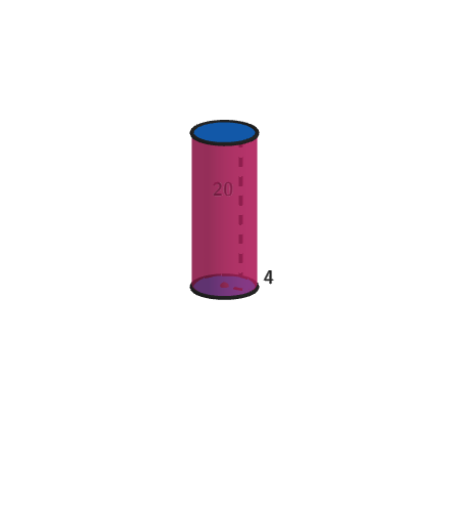
This example demonstrates how to calculate the surface area of cylinders by unfolding their nets. The key mathematical concepts include the geometry of cylinders, net unfolding, and surface area formulas. Construction involves using GeoGebra commands like Shuffle, Element, Rotate, and Circle to create and manipulate the cylinder model. It is suitable for students in grades 6-8 to understand solid geometry and surface area calculations.
GeoGebra Commands & Parameters
Shuffle(Sequence[5]) → randomList2, {2, 4, 3, 5, 1}Element(randomList2, Mod[countQuestion, 5] + 1) → randomNum2Shuffle(Flatten[Append[Factors[randomNum2] \ {randomNum2}, 1]]) → l3, {1, 2, 2}Element(l3, 1) → DivShuffle(Sequence[2, 5]) → randomList1, {3, 5, 2, 4}Element(randomList1, Mod[countQuestion, 4] + 1) → randomNum1Zip(Element[legends, kk], kk, clickedSurfaces) → legendsToShowZip(Element[formulas, kk], kk, clickedSurfaces) → formulasToShowIf(abs(tCil) < 1, ((rCil * sin((-θCil))), ((rCil * (1 - cos((-θCil)))) * cos(ϕCil)) - (hei * sin(ϕCil)), (hei * cos(ϕCil)) + ((rCil * (1 - cos((-θCil)))) * sin(ϕCil))), ((-pi), ((-hei) * sin(ϕCil)), (hei * cos(ϕCil)))) → CEIf(abs(tCil) < 1, ((rCil * sin(θCil)), ((rCil * (1 - cos(θCil))) * cos(ϕCil)) - (hei * sin(ϕCil)), (hei * cos(ϕCil)) + ((rCil * (1 - cos(θCil))) * sin(ϕCil))), (pi, ((-hei) * sin(ϕCil)), (hei * cos(ϕCil)))) → CFIf(abs(tCil) < 1, ((rCil * sin((-θCil))), ((rCil * (1 - cos((-θCil)))) * cos(ϕCil)), ((rCil * (1 - cos((-θCil)))) * sin(ϕCil))), ((-pi), 0, 0)) → CGIf(abs(tCil) < 1, ((rCil * sin(θCil)), ((rCil * (1 - cos(θCil))) * cos(ϕCil)), ((rCil * (1 - cos(θCil))) * sin(ϕCil))), (pi, 0, 0)) → CHSegment(CE, CG) → mCilSegment(CF, CH) → nCilIf(abs(tCil) < 1, CurveCartesian[(rCil * sin((CLIPBOARDmagicSTRINGu * θCil))), ((rCil * (1 - cos((CLIPBOARDmagicSTRINGu * θCil)))) * cos(ϕCil)), ((rCil * (1 - cos((CLIPBOARDmagicSTRINGu * θCil)))) * sin(ϕCil)), CLIPBOARDmagicSTRINGu, -1, 1], CurveCartesian[(pi * CLIPBOARDmagicSTRINGu), 0, 0, CLIPBOARDmagicSTRINGu, -1, 1]) → lCilIf(abs(tCil) < 1, CurveCartesian[(rCil * sin((CLIPBOARDmagicSTRINGu * θCil))), ((rCil * (1 - cos((CLIPBOARDmagicSTRINGu * θCil)))) * cos(ϕCil)) - (hei * sin(ϕCil)), (hei * cos(ϕCil)) + ((rCil * (1 - cos((CLIPBOARDmagicSTRINGu * θCil)))) * sin(ϕCil)), CLIPBOARDmagicSTRINGu, -1, 1], CurveCartesian[(pi * CLIPBOARDmagicSTRINGu), ((-hei) * sin(ϕCil)), (hei * cos(ϕCil)), CLIPBOARDmagicSTRINGu, -1, 1]) → jCilIf(abs(tCil) < 1, Surface[(rCil * sin((CLIPBOARDmagicSTRINGu * θCil))), ((rCil * (1 - cos((CLIPBOARDmagicSTRINGu * θCil)))) * cos(ϕCil)) - (CLIPBOARDmagicSTRINGv * sin(ϕCil)), (CLIPBOARDmagicSTRINGv * cos(ϕCil)) + ((rCil * (1 - cos((CLIPBOARDmagicSTRINGu * θCil)))) * sin(ϕCil)), CLIPBOARDmagicSTRINGu, -1, 1, CLIPBOARDmagicSTRINGv, 0, hei], Surface[(pi * CLIPBOARDmagicSTRINGu), ((-CLIPBOARDmagicSTRINGv) * sin(ϕCil)), (CLIPBOARDmagicSTRINGv * cos(ϕCil)), CLIPBOARDmagicSTRINGu, -1, 1, CLIPBOARDmagicSTRINGv, 0, hei]) → iCilRotate(Rotate[eCil, ϕCil, Line[CC, xAxis]], ϕCil, xAxis) → topCilCircle((0, 1, 0), 1, xOyPlane) → baseCilCircle((0, 1, 0), 1, xOyPlane) → baseCil2Segment((0, 1, 0), (1, 1, 0)) → segRadTableText(formulas) → text1Polygon({((-pi), 0, 0), (pi, 0, 0), (pi, (-hei), 0), ((-pi), (-hei), 0)}) → unfoldedCilinderTranslate(baseCil2, Vector[(-(0, 2 + hei))]) → baseCil2'Zip(Element[formulasR, kk], kk, clickedSurfaces) → formulasToShowRAppend("\phantom{=}", Sequence["=", ii, 1, Length[formulasToShow] - 1]) → equalSignsTableText(formulasToShowR, "r") → completeTableText("\textsf{Click all sections of the net}", (-3.1, 4.8), true, true, -1, 1) → onboardingSurfacesVector(G, H) → onboardingSegmentArrow1PointIn(baseCil2) → IVector(G, I) → onboardingSegmentsArrow2Text(SADyn, B, true, true, -1, -1) → text8Zip(If[kk ≟ 2, ((2 * input1) * input2), kk ≟ 1, 0, input1^(2)], kk, clickedSurfaces) → l1Corner(5) → LVector(E, F) → onboardingSurfaceArrowTableText(legendsToShow, Sequence["\hspace{110}\vspace{10}", kk, 1, Length[formulasToShow]], formulasToShow, "vlcr") → tableLeftTableText({(("\color{" * colorBlue) * "}\rule{35mm}{0.5mm}"), "\hspace{20}", (("\color{" * colorBlue) * "}\rule{45mm}{0.5mm}")}, {(("\color{" * colorBlue) * "}\textsf{Surface Area =}"), "", formulaBelowTable}, "lcr") → belowTableCorner(5) → AText("\textsf{Click one}", G + (-0.5, 1), true, true) → onboardingSegments
AI Drawing Prompt Reference
Create a 3D cylinder model and a corresponding unfolded net for surface-area calculation. Show the cylinder with its circular base and the curved lateral surface represented as a strip, then unfold that curved surface into the plane by mapping along the angular direction and the height direction, forming a rectangular-like net whose boundary is symmetric at the left and right ends. Include the base and side relationships in the drawing so the net clearly corresponds to the cylinder. Add on-screen guidance text and a table/annotation area indicating that users should click the sections of the net to reveal the associated surface-area formulas. The final composition should include both the 3D cylinder and its 2D net with interactive-style labels.
The prompt above was compiled from the original drawing commands and is for reference only.