
Calculating Area Under a Curve
Loading the math board and drawing, please wait…
In collections
Area and Volume
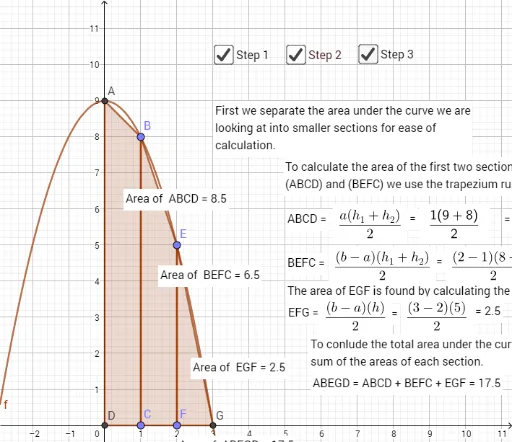
This example demonstrates how to calculate the area under a curve using GeoGebra, involving core concepts like integration, functions, polygons, and vectors. It utilizes commands such as Intersect, Point, Polygon, PointIn, and Segment for construction, making it suitable for high school and above students learning calculus applications.
GeoGebra Commands & Parameters
Intersect(f, yAxis, 1) → APoint(f) → BPoint(xAxis) → CIntersect(xAxis, yAxis) → DPolygon(A, B, C, D) → q1, a, b, c, dPoint(f) → EPoint(xAxis) → FPolygon(B, E, F, C) → q2, b_1, e, f_1, c_1Intersect(f, xAxis, 2) → GPolygon(E, G, F) → t1, f_2, e_1, gPointIn(q1) → Pointq1PointIn(q2) → Pointq2PointIn(t1) → Pointt1Segment(D, F) → iSegment(G, D) → jPolygon(A, B, E, G, D) → poly1, a_1, b_2, e_2, g_1, d_1PointIn(poly1) → Pointpoly1
AI Drawing Prompt Reference
Draw a curve and its intersections with the x and y axes, then connect these points to form multiple polygons, and calculate the area under the curve to demonstrate the application of integration.
The prompt above was compiled from the original drawing commands and is for reference only.