
Trapezium Area Calculation by Karis
Loading the math board and drawing, please wait…
In collections
Area and Volume
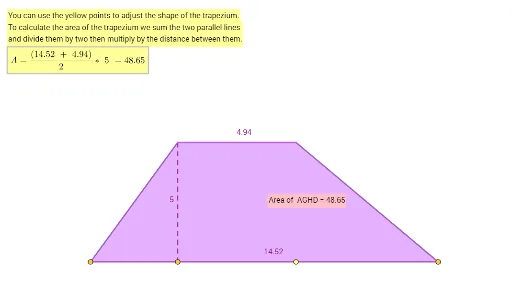
This example demonstrates how to draw a trapezium and calculate its area using GeoGebra. Key math concepts include trapezium definition, area formula, and analytical geometry. Construction highlights involve commands like Point, Segment, Intersect, Polygon, PointIn, and objects such as f, A, B, C, D, E, F for area computation. Suitable for high school mathematics teaching or self-learning to understand trapezium area calculation and GeoGebra geometric construction features.
GeoGebra Commands & Parameters
Point(f) → APoint(f) → BPoint(f) → CPoint(f) → DSegment(D, F) → jSegment(F, E) → kSegment(E, A) → lSegment(E, B) → mSegment(F, C) → nIntersect(k, l) → GIntersect(j, k) → HPolygon(A, G, H, D) → q1, a, g_1, h_1, dSegment(A, D) → gPointIn(q1) → Pointq1
AI Drawing Prompt Reference
Draw a trapezoid ABCD with A and D as the endpoints of the base, and B and C as the endpoints of the non-parallel sides. Connect the non-parallel sides with points F and E, which intersect the base at points G and H. Then use points A, G, H, and D to draw a quadrilateral and calculate the area of the trapezoid.
The prompt above was compiled from the original drawing commands and is for reference only.