
Area of a Parallelogram by Karis
Loading the math board and drawing, please wait…
In collections
Area and Volume
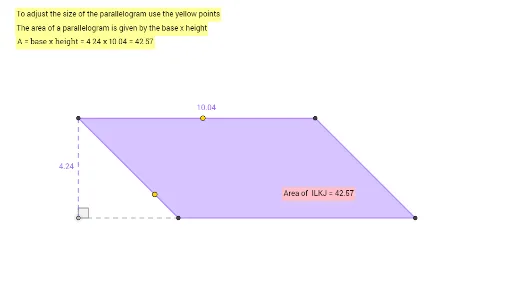
This example demonstrates how to calculate the area of a parallelogram by constructing its height. Key math concepts include parallelogram, area formula, height, and triangle similarity. It uses commands like Point, Line, Intersect, Segment, Polygon, OrthogonalLine, Angle, PointIn in GeoGebra. Suitable for middle school students and above to learn the area calculation method, and also useful for analytical geometry teaching.
GeoGebra Commands & Parameters
Point(yAxis) → ALine(A, A) → fLine(A, xAxis) → gLine(D, h) → jLine(C, j) → kIntersect(g, j) → EIntersect(g, k) → FIntersect(i, k) → GIntersect(i, j) → HSegment(H, E) → lSegment(F, G) → mSegment(G, H) → nSegment(E, F) → pIntersect(l, p) → IIntersect(m, p) → JIntersect(m, n) → KIntersect(l, n) → LPolygon(I, L, K, J) → q1, i_1, l_1, k_1, j_1OrthogonalLine(I, i) → qIntersect(i, q) → MSegment(I, M) → rSegment(M, L) → sAngle(L, M, I) → αPointIn(q1) → Pointq1
AI Drawing Prompt Reference
Draw a parallelogram and calculate its area by constructing its height. Start by taking a point A on the y-axis, then draw a line f parallel to the x-axis through A, and a line g perpendicular to the x-axis. Next, draw a line j parallel to g through D, and a line k parallel to h, find the intersections E and F of j and k, and G and H of i and k, then connect H and E, F and G, G and H, E and F, find the intersections I and L, K and J of these lines, construct parallelogram IJKL. Then draw a perpendicular line q from I to i, find the intersection M of q and i, connect I and M, M and L, form angle α, and finally take a point inside q1 as the height of the parallelogram.
The prompt above was compiled from the original drawing commands and is for reference only.