
Build Your Own Right Triangular Prism (V2) by Ms. Orr
Loading the math board and drawing, please wait…
In collections
Geometry - Areas and Volumes
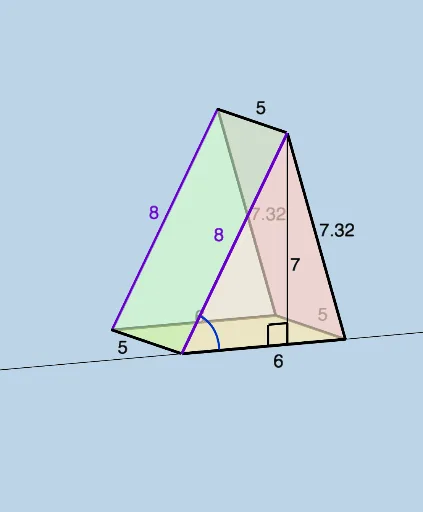
This example demonstrates how to construct a right triangular prism using GeoGebra. It involves core mathematical concepts such as solid geometry, polygon construction, and angle calculations. Key GeoGebra commands and objects used include Line, Sphere, Segment, Intersect, Polygon, Circle, OrthogonalLine, Angle, and Textfield for geometric construction and parameterization. Suitable for high school students and above for exploring geometric solids.
GeoGebra Commands & Parameters
Line((0, 0, triangleheight), (1, 0, triangleheight)) → fSphere(A, oneside) → aSegment(B, A) → jIntersect(f, a) → C, DPolygon(A, C, B) → t1, b_1, a_1, cPolygon(A, D, B) → t2, b_2, a_2, dSegment(A, C) → gSegment(C, B) → iLine(A, (0, 1, 0)) → kLine(B, (b, 1, 0)) → lSphere(B, prismheight) → mSphere(A, prismheight) → eIntersect(k, e) → E, FIntersect(l, m) → G, HLine((x(C), y(C) + 1, z(C)), C) → nSphere(C, prismheight) → oIntersect(n, o) → I, JPolygon(H, F, I) → t3, i_1, h_1, f_1Segment(H, F) → pSegment(F, I) → qSegment(I, H) → rLine((x(D), y(D) + 1, z(D)), D) → tSphere(D, prismheight) → uIntersect(t, u) → K, LPolygon(A, F, I, C) → q1, a_3, f_2, i_2, c_1Polygon(I, H, B, C) → q2, i_3, h_2, b_3, c_2Polygon(A, B, H, F) → q3, a_4, b_4, h_3, f_3Segment(C, I) → g_1Segment(B, H) → j_1Segment(A, F) → k_1Polygon(A, B, D) → t4, d_2, a_5, b_5Polygon(F, H, K) → t5, k_2, f_4, h_4Polygon(A, F, K, D) → q4, a_6, f_5, k_3, d_3Polygon(D, K, H, B) → q5, d_4, k_4, h_5, b_6Segment(A, D) → l_1Segment(D, B) → m_1Segment(D, K) → n_1Segment(K, F) → p_1Segment(K, H) → q_1Circle(((0.3 * j), 0, 0), ((-0.3 * j), 0, 0), (0, 0, (0.3 * j))) → r_1Line(A, B) → s_1OrthogonalLine(C, s_1, space) → t_1OrthogonalLine(D, s_1, space) → g_2Intersect(s_1, t_1) → MIntersect(s_1, g_2) → NAngle(A, M, C) → αAngle(A, N, D) → βSegment(C, M) → j_2Segment(D, N) → l_2Angle(B, A, D) → γAngle(B, A, C) → δTextfield(prismheight) → InputBox1Textfield(b) → InputBox2Textfield(triangleheight) → InputBox3Textfield(oneside) → InputBox4
AI Drawing Prompt Reference
Draw a right triangular prism by first constructing a triangular base using line segments and arcs, then extend upward to form the lateral faces, ensuring they are perpendicular to the base. Connect the top vertices to complete the prism, highlighting key angles and geometric relationships to showcase its 3D structure.
The prompt above was compiled from the original drawing commands and is for reference only.