
Curved Surface Area of Cones Demo
Loading the math board and drawing, please wait…
In collections
Geometry - Areas and Volumes
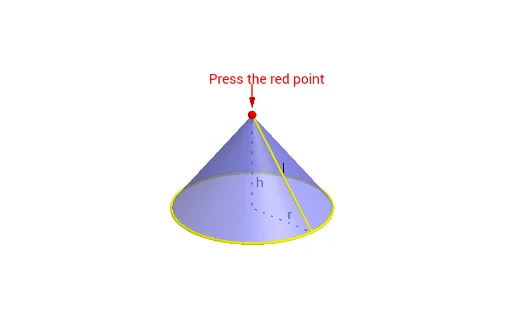
This example demonstrates how the curved surface area of a cone equals a sector. It involves core math concepts like surface area, sector geometry, Pythagorean theorem, and algebra. Constructed using GeoGebra commands such as Point, Circle, Intersect, Rotate, Mirror, Segment, CircumcircleArc, Surface, and Vector. Ideal for high school students and math enthusiasts to visualize and understand the geometric principles behind cone surface area calculations.
GeoGebra Commands & Parameters
Point(zAxis) → APoint(Segment[A, (0, 0, 0)]) → PPoint(xAxis) → BCircle(P, Distance[A, B], yAxis) → cIntersect(xOyPlane, c) → C, DIntersect(xAxis, yAxis) → ORotate(D, γ, zAxis) → D_1Rotate(D_1, α, zAxis) → D'Rotate(D_1, (π * x(B) / x(D)), zAxis) → D'_1Mirror(D'_1, O) → ESegment(P, D') → eCircle(zAxis, B) → gCircumcircleArc(D_1, E, D') → hCircumcircleArc(D_1, D'_1, D') → dSegment(P, D_1) → bSurface((u * cos(v)), (u * sin(v)), f(u), u, 0, x(D), v, γ, (2 * π) - γ) → aVector(A + (0, 0, 1), A + (0, 0, 0.2)) → uSegment(O, A) → iSegment(O, B) → j
AI Drawing Prompt Reference
Draw the lateral surface of a cone, including the center of the base O, the vertex A, points D and D' on the circumference of the base, and the arc D'_1 and E generated by rotating D'. Create a cylinder using points A and B, then draw the curved surface of the cone, using rotation and mirroring to generate the cone's lateral surface展开图。
The prompt above was compiled from the original drawing commands and is for reference only.