
Build the Net of a Cube by Ivan De Winne
Loading the math board and drawing, please wait…
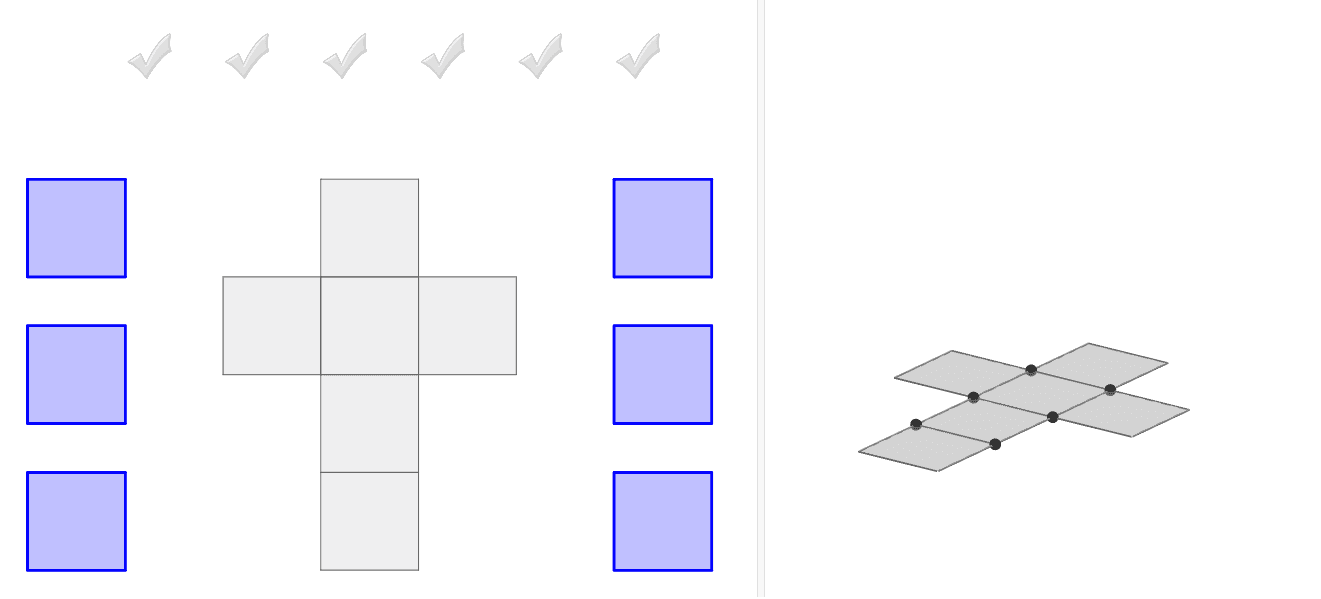
This example demonstrates how to construct the net of a cube by dragging square faces onto a grey net. It involves core math concepts like polygons, solid geometry, and geometric construction. Key GeoGebra commands used include Polygon, Intersect, Point, Cube, and Net. Suitable for high school students learning solid geometry or for educational demonstrations.
GeoGebra Commands & Parameters
Polygon(M, N, C_1, N_2) → poly3, m_2, n, c_1, n_2Polygon(K_4, T_4, 4) → poly11, q, r, s, t, D_5, E_5Polygon(C_4, D_4, 4) → poly9, b, e, f_1, g_1, F_5, G_5Polygon(V_3, W_3, 4) → poly8, r_1, s_1, t_1, a_1, Z_3, A_4Polygon(Z_2, A_3, 4) → poly7, m_1, n_1, p_1, q_1, B_3, C_3Polygon(I_4, F_4, 4) → poly10, h_1, i_1, j_1, k_1, H_5, I_5Polygon(A_5, V_4, 4) → poly12, b_1, d_1, e_1, f_2, J_5, K_5Intersect(zAxis, xAxis) → APoint(xAxis) → BPolygon(A, B, 4, xOyPlane) → poly1, f, g, h, i, C, DCube(A, B, Point[Circle[B, Distance[A, B], Segment[A, B]]]) → a, E, face11, face12, edge20, edge21, edge22, edge23, edge24, edge25, edge26, edge27, F, edge28, edge29, edge30, edge31, G, H, B_4, face7, face8, face9, face10Point(Circle[B, Distance[A, B], Segment[A, B]]) → INet(a, c) → d, V_1, G_2, H_2, I_2, J_2, K_2, face1, face2, face4, face5, face3, W_1, face6, edge1, edge5, edge8, edge2, edge3, edge13, edge6, edge7, edge16, Z_1, edge9, edge10, edge17, edge11, edge12, edge18, edge4, edge15, edge19, edge14, A_2, B_2, C_2, D_2, E_2, F_2Net(a, o) → p, H_3, Q_3, R_3, S_3, T_3, U_3, face13, face14, face16, face17, face15, I_3, face18, edge39, edge43, edge46, edge40, edge41, edge51, edge44, edge45, edge54, J_3, edge47, edge48, edge55, edge49, edge50, edge56, edge42, edge53, edge57, edge52, K_3, L_3, M_3, N_3, O_3, P_3Polygon(J, K, L, M) → poly2, j, k, l, mPolygon(L, O_2, P_2, Q_2) → poly4, l_1, o_2, p_2, q_2Polygon(N, O_2, R_2, S_2) → poly5, n_3, o_1, r_2, s_2Polygon(L, O_2, N, M) → poly6, l_2, o_3, n_4, m_3Polygon(T_2, U_2, P_2, Q_2) → poly13, t_2, u_2, p_3, q_3Vector(B_5, C_5) → u
AI Drawing Prompt Reference
Draw a cube net with six square faces. Start by drawing the base, then add four side faces and one top face, ensuring each square face shares edges with adjacent faces.
The prompt above was compiled from the original drawing commands and is for reference only.