
Box Q1 Geometric Construction
Loading the math board and drawing, please wait…
In collections
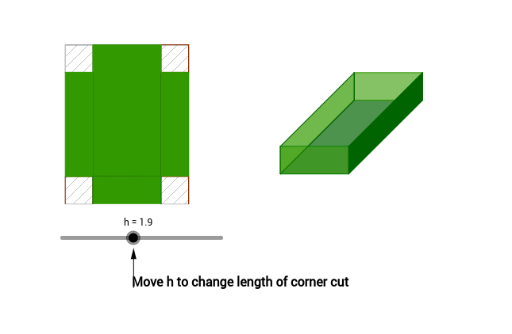
Modeling Volume as a function of height
This example demonstrates how to construct a rectangle with an inscribed circle using GeoGebra, showcasing related geometric properties. Core math concepts include incircle, function graph, vector, rotation, polygon construction, etc. Construction highlights involve commands like Circle, Vector, Translate, Intersect, Rotate, Polygon, Segment, OrthogonalLine, newbox, Point, blackbox, Length. Suitable for high school mathematics teaching on geometric construction and properties of inscribed circles.
GeoGebra Commands & Parameters
Circle(Origin, len - (2 * h)) → cVector((width - (2 * h), 0)) → uTranslate(A, u) → A'Intersect(c, xAxis) → B, CRotate(C, α) → C'Vector(C') → vTranslate(A, v) → A'_1Translate(A', v) → A''Polygon(A, A'_1, A'', A') → poly1, a, a'_1, a'', a'Vector((0, h)) → wTranslate(A, w) → A'_2Translate(A', w) → A''_1Translate(A'_1, w) → DTranslate(A'', w) → A'''Segment(A'_2, A) → bSegment(A''_1, A') → dSegment(D, A'_1) → eSegment(A''', A'') → fPolygon(A'_2, A''_1, A', A) → poly2, a'_2, a''_1, a'_3, a_1Polygon(D, A''', A'', A'_1) → poly3, d_1, a''', a''_2, a'_4Polygon(A''_1, A''', A'', A') → poly4, a''_3, a'''_1, a''_4, a'_5Polygon(D, A'_2, A, A'_1) → poly5, d_2, a'_6, a_2, a'_7Rotate(E, α) → E'Vector(E') → gSegment(W_1, A_2) → c_7Segment(A_2, Z_1) → d_7Segment(Z_1, V_1) → e_7Segment(V_1, W_1) → f_7Segment(Paper, U_1) → g_7Segment(U_1, S_1) → h_7Segment(S_1, T_1) → i_7Segment(T_1, Paper) → j_7OrthogonalLine(Z_1, g_7) → m_7OrthogonalLine(Z_1, h_7) → n_7OrthogonalLine(A_2, h_7) → a_8OrthogonalLine(W_1, i_7) → b_8Intersect(j_7, a_8) → B_2Intersect(i_7, b_8) → C_2Intersect(m_7, i_7) → D_2Intersect(h_7, a_8) → E_2Intersect(n_7, h_7) → F_2Intersect(m_7, g_7) → G_2Intersect(g_7, b_8) → H_2Intersect(n_7, j_7) → I_2Polygon(B_2, W_1, 4) → poly26, c_8, d_8, e_8, f_8, J_2, K_2Polygon(Paper, H_2, 4) → poly27, g_8, h_8, i_8, j_8, L_2, M_2Polygon(G_2, U_1, 4) → poly28, k_8, l_8, m_8, n_8, N_2, O_2Polygon(A_2, E_2, 4) → poly29, p_8, q_8, r_8, s_8, P_2, Q_2Polygon(V_1, Z_1, A_2, W_1) → poly31, v_1, z_1, a_9, w_1newbox(α, E, G) → n, p, c_1, e_1, f_1, g_1, h_1, i_1, j_1, k_1, J, q, H, poly6, poly7, r, s, t, b_1Intersect(r, i_1) → KIntersect(r, i_1) → LIntersect(r, e_1) → MPolygon(J, M, H, G) → poly8, j_2, m_1, h_2, g_2Polygon(B_2, W_1, V_1, I_2) → poly9, b_2, w_2, v_2, i_2Polygon(W_1, A_2, D_2, C_2) → poly10, w_3, a_3, d_3, c_2Point(w_3) → NPolygon(N, Z_1, F_2, E_2) → poly11, n_1, z_2, f_2, e_2Point(n_1) → OPoint(w_2) → PPolygon(H_2, G_2, O, P) → poly12, h_3, g_3, o, p_1blackbox(α, E, Q) → poly13, poly14, r_1, s_1, t_1, k_2, l_2, m_2, n_2, p_2, q_2, r_2, poly15, s_2, t_2, i, j, k, l, m, l_1, q_1blackbox(α, E, R) → poly16, poly17, l_3, m_3, n_3, p_3, q_3, r_3, s_3, t_3, a_4, b_4, poly18, c_4, d_4, b_3, c_3, e_3, f_3, i_3, j_3, k_3Vector(S, T) → u_1Point(xAxis) → UOrthogonalLine(U, xAxis) → e_4Point(xAxis) → VOrthogonalLine(V, xAxis) → f_4Segment(U, V) → g_4Length(g_4) → o_1Translate(W, u_1) → W'Translate(W', u_1) → W''Vector(W', W'') → u_2
AI Drawing Prompt Reference
Draw a rectangle inscribed in a circle. Start by plotting the circle's center and radius, then create the rectangle's sides using rotations and vector translations to determine the vertices. Connect the vertices with line segments to form the rectangle and circle. Finally, show the perpendicular lines from the circle's center to the rectangle's sides, and the internal polygons formed by these lines, highlighting geometric properties.
The prompt above was compiled from the original drawing commands and is for reference only.