
Bollen Dandelin Version 2
Loading the math board and drawing, please wait…
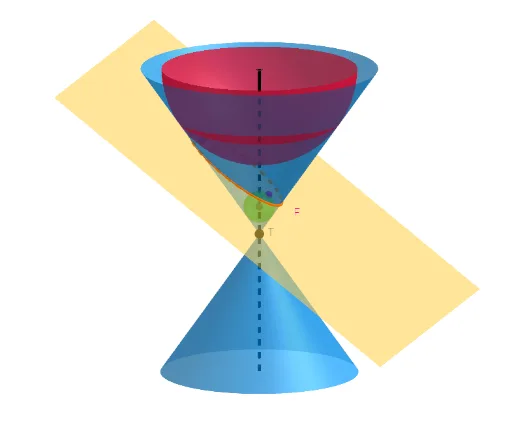
This example demonstrates the geometric construction of Bollen Dandelin, involving core concepts of circles, vectors, and solid geometry. It uses GeoGebra commands such as Rotate, Point, Line, InfiniteCone, and Intersect to show the generation of conic sections. Suitable for high school mathematics education and learning.
GeoGebra Commands & Parameters
Rotate(Rotate[Translate[z = 0, Vector[T, T + (0, 0, h)]], α, T + (0, 0, h), yAxis], β, T, zAxis) → bPoint(zAxis) → APoint(zAxis) → BLine(A, B) → aInfiniteCone(T, a, γ) → cIntersectPath(b, c) → dDirectrix(d) → g, fFocus(d) → E, FOrthogonalLine(E, b) → iOrthogonalLine(F, b) → jIntersectPath(b, c) → eIntersect(a, i) → CIntersect(j, a) → DSphere(C, E) → kSphere(D, F) → l
AI Drawing Prompt Reference
Draw a three‑dimensional scene with an infinite double cone whose vertex is T and whose axis passes through two points on the z‑axis. Construct a cutting plane by translating the xy‑plane and rotating it twice, then intersect the plane with the cone to obtain a conic section. Show the two directrices and the two foci of the conic. From each focus drop a line perpendicular to the cutting plane; where these perpendiculars meet the cone axis mark the centers of two Dandelin spheres. Draw the spheres with radii equal to the distances from their centers to the corresponding foci, illustrating their tangency to both the cone and the cutting plane.
The prompt above was compiled from the original drawing commands and is for reference only.