
Black-and-White Temari-Style Patterns on a Sphere
Loading the math board and drawing, please wait…
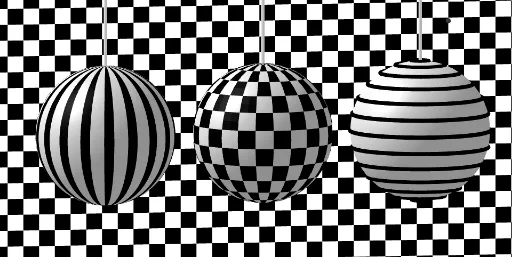
This example demonstrates how to generate a black-and-white temari-ball-like decorative pattern on the surface of a sphere by combining 3D geometric objects and constructed curves. The construction highlights solid geometry (a Sphere), Cartesian curve construction (CurveCartesian) for the pattern’s guiding curves, and the use of lines, segments, and polygons (Line, Segment, Polygon, Join) to build bounded regions and strip-like sections on the surface. It also uses Sequence to iterate or replicate elements that create repeating structure, producing the alternating visual bands. From the GeoGebra construction summary, the key commands are CurveCartesian, Line, Surface, Sphere, Sequence, Polygon, Join, and Segment, along with numerous constructed points/parameters (e.g., A, B, O, R, and intermediate named objects) that control the layout. Suitable for advanced middle school through early university geometry/visualization lessons and for users exploring geometric constructions and sequence-driven pattern generation.
GeoGebra Commands & Parameters
CurveCartesian(x(B) + (R * cos(i)), y(B), z(B) + (R * sin(i)), i, ((-π)) / 2, π / 2) → aLine(B, zAxis) → fSurface(a, 0.145, f) → cLine(A, xAxis) → gSphere(B, R - 0.01) → iSphere(A, R - 0.01) → jSphere(O, R - 0.02) → kSequence(Rotate[c, i, f], i, 0, (2 * π), (2 * π / 18)) → l3Polygon(F, G, I, H) → q1, f_1, g_1, i_1, h_1Sequence(Sequence[Translate[q1, Vector[(i * Vector[F, G]) + (j * Vector[F, H])]], i, 1, 36, 2], j, 1, 28, 2) → l5Sequence(Sequence[Translate[q1, Vector[(i * Vector[F, G]) + (j * Vector[F, H])]], i, 0, 36, 2], j, 0, 28, 2) → l6Join(Sequence[Sequence[O + (((R * cos(i)) * cos(j)), ((R * cos(i)) * sin(j)), (R * sin(i))), j, 0, 6.28319, π / m], i, 0, 6.28319, π / m]) → l1Sequence(Polygon[Element[l1, i], Element[l1, i + 1], Element[l1, i + 1 + d], Element[l1, i + d]], i, 1, Length[l1], h) → l2Segment(B, B + (0, 0, 14)) → lSegment(O, O + (0, 0, 14)) → nSegment(A, A + (0, 0, 14)) → pSequence(CurveCartesian[x(A) + ((R * cos(i)) * cos(j)), y(A) + ((R * sin(i)) * cos(j)), z(A) + (R * sin(j)), i, 0, 6.28319], j, 0, (2 * π), (2 * π / (m + 2))) → l4
AI Drawing Prompt Reference
Create a black-and-white temari-style decorative pattern on a sphere. Start with a sphere, then generate guiding curves on its surface that resemble meridians. Rotate these curves around the vertical axis to create evenly spaced bands. On the sphere, construct polygons that form a checkerboard-like pattern, and translate them repeatedly to cover the entire surface. Finally, add vertical line segments extending upward from key points on the sphere for structural reference. The result should be a symmetric, repeating geometric design.
The prompt above was compiled from the original drawing commands and is for reference only.