
Bisect an Angle by Jennifer Silverman
Loading the math board and drawing, please wait…
In collections
Constructions Crash Course for Teachers
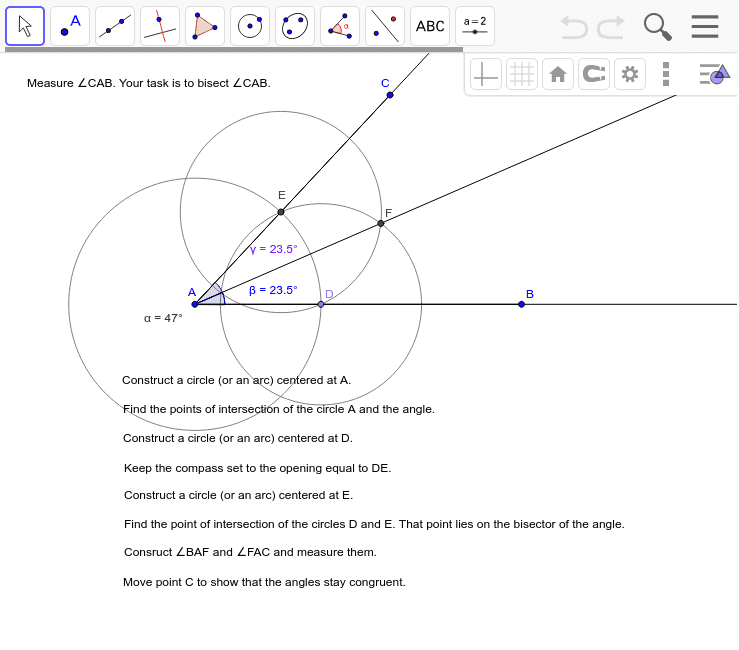
This example demonstrates how to bisect an angle using GeoGebra tools. Key mathematical concepts include the properties of angles and geometric constructions. By using commands such as line segments, circles, and intersections, the angle bisector can be accurately constructed. Suitable for teachers learning basic geometric construction techniques.
GeoGebra Commands & Parameters
Segment(A, B) → aSegment(A, C) → bAngle(B, A, C) → αPoint(a) → DCircle(A, D) → dIntersect(d, b, 1) → ECircle(D, E) → hCircle(E, Radius[h]) → cIntersect(h, c, 2) → FRay(A, B) → eRay(A, C) → fRay(A, F) → gAngle(D, A, F) → βAngle(F, A, E) → γ
AI Drawing Prompt Reference
Draw an angle ABC, then draw two circles with center A and radii AB and AC, respectively, to find their intersection points D and E. Draw another circle with center A and radius AD or AE, and find its intersection with the first circle to get point F. Finally, draw a ray from A through F, which is the angle bisector of angle ABC.
The prompt above was compiled from the original drawing commands and is for reference only.