
Binomial and Normal Distributions
Loading the math board and drawing, please wait…
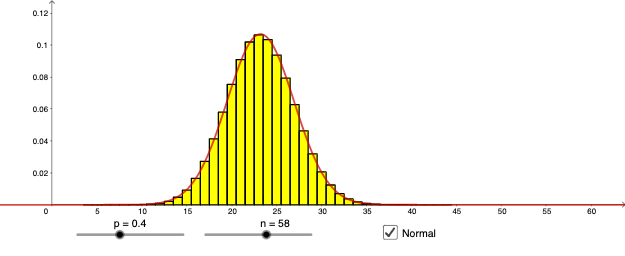
This example illustrates the graphical characteristics of binomial and normal distributions and their relationship. Key mathematical concepts include binomial and normal distributions in probability and statistics. By adjusting parameters n and p, the shape of the binomial distribution can be observed and compared with the normal distribution. GeoGebra commands BinomialDist, Normal, and Max are used to construct the graph. Suitable for high school and above students to learn probability and data analysis.
GeoGebra Commands & Parameters
BinomialDist(n, p) → aBinomialDist(n, p) → bNormal((n * p), sqrt(((n * p) * (1 - p))), x, false) → fMax(f, 0, n) → A
AI Drawing Prompt Reference
In a single coordinate plane, plot and compare a binomial distribution with its corresponding normal approximation. Using chosen parameters n and p, create the binomial distribution representation over the relevant discrete range (as a set of probabilities/curve at integer values) and ensure it is based on those same n and p. Then draw the normal distribution curve using mean (n·p) and standard deviation sqrt((n·p)·(1−p)). Display only the positive portion of the combined/normalized result so the shapes of the binomial and normal distributions can be compared visually.
The prompt above was compiled from the original drawing commands and is for reference only.