
Bicylinder and Sphere
Loading the math board and drawing, please wait…
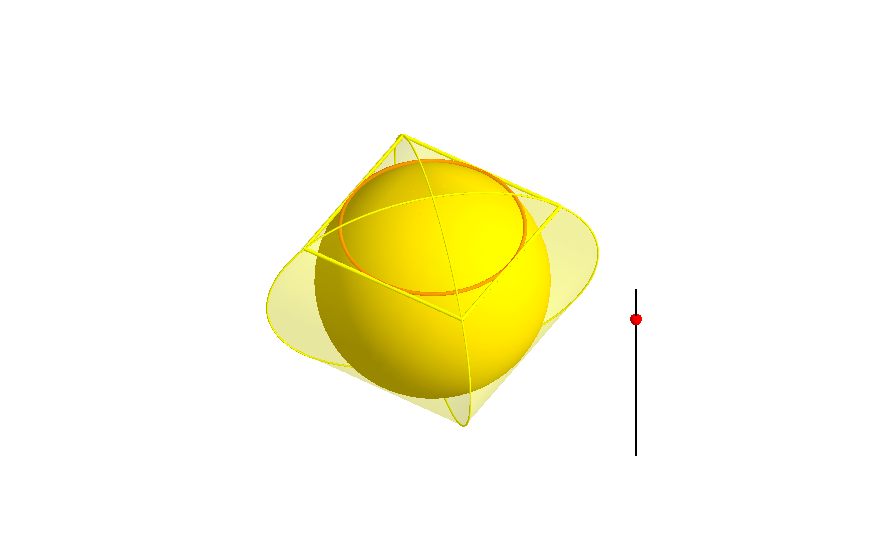
This example demonstrates how the bicylinder (or Mouhefanggai) circumscribes a sphere. It involves important concepts in solid geometry, such as the intersection of surfaces and spheres. Using GeoGebra commands like Point, CurveCartesian, Surface, and Intersect, one can visually understand these geometric constructions. Suitable for high school mathematics education and learning.
GeoGebra Commands & Parameters
Point(xAxis) → APoint(xAxis) → BPoint(yAxis) → CPoint(yAxis) → DCurveCartesian(sqrt(1 - t^(2)), sqrt(1 - t^(2)), t, t, -1, 1) → mCurveCartesian((-sqrt(1 - t^(2))), sqrt(1 - t^(2)), t, t, -1, 1) → nCurveCartesian((-sqrt(1 - t^(2))), (-sqrt(1 - t^(2))), t, t, -1, 1) → oCurveCartesian(sqrt(1 - t^(2)), (-sqrt(1 - t^(2))), t, t, -1, 1) → pSurface(sqrt(1 - t^(2)), (s * sqrt(1 - t^(2))), t, s, -1, 1, t, -1, 1) → iSurface((s * sqrt(1 - t^(2))), sqrt(1 - t^(2)), t, s, -1, 1, t, -1, 1) → jSurface((-sqrt(1 - t^(2))), (s * sqrt(1 - t^(2))), t, s, -1, 1, t, -1, 1) → kSurface((s * sqrt(1 - t^(2))), (-sqrt(1 - t^(2))), t, s, -1, 1, t, -1, 1) → lIntersect(yAxis, xAxis) → ESegment((2, 0, -1), (2, 0, 1)) → bPoint(b) → FOrthogonalPlane(F, b) → cIntersectPath(c, a) → dSegment(J, G) → eSegment(G, H) → fSegment(H, I) → gSegment(I, J) → h
AI Drawing Prompt Reference
Draw a bicylinder and a sphere, showing how the bicylinder circumscribes a sphere. Start by plotting points on the x-axis and y-axis, then create four symmetric curves to form the cross-sections of the bicylinder. Use these cross-sections to generate the two surfaces of the bicylinder. Finally, create a line segment on the x-axis and generate an orthogonal plane around it. The intersection of this plane with the bicylinder forms a line that demonstrates how the bicylinder circumscribes the sphere.
The prompt above was compiled from the original drawing commands and is for reference only.