
BDG Pool Table Geometric Construction
Loading the math board and drawing, please wait…
In collections
Rate & Accumulation Yr 4 Much&Fast
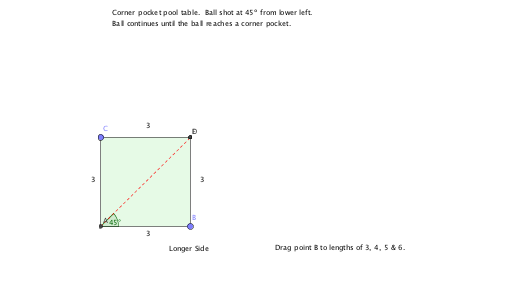
This example demonstrates the geometric construction and angle relationships of pool tables of different sizes (3X3, 3X4, 3X5, 3X6). It involves core mathematical concepts such as angles, fractions, derivatives, secant lines, expected value, and ratios. The construction uses GeoGebra commands like Intersect, Point, OrthogonalLine, Polygon, Rotate, Angle, Line, Segment, and Ray. It is suitable for high school mathematics teaching, aiding in the understanding of geometric constructions and related concepts.
GeoGebra Commands & Parameters
Intersect(xAxis, yAxis) → APoint(xAxis) → BPoint(yAxis) → COrthogonalLine(C, yAxis) → fOrthogonalLine(B, xAxis) → gIntersect(g, f) → DPolygon(A, B, D, C) → poly1, a, b, d, cRotate(B, 45°, A) → B'Angle(B, A, B') → αLine(A, B') → hIntersect(h, d) → ESegment(A, E) → iRotate(A, 45°, E) → A'Rotate(D, (-(45°)), E) → D'Angle(D', E, D) → βLine(E, D') → jIntersect(j, b) → FSegment(E, F) → kRotate(B, (-(45°)), F) → B'_1Angle(B'_1, F, B) → γLine(F, B'_1) → lIntersect(l, a) → GSegment(F, G) → mRotate(A, (-(45°)), G) → A'_1Angle(A'_1, G, A) → δLine(G, A'_1) → nIntersect(n, d) → HSegment(G, H) → pRotate(C, 45°, H) → C'Angle(C, H, C') → εLine(H, C') → qIntersect(q, c) → ISegment(H, I) → rRotate(A, 45°, I) → A'_2Angle(A, I, A'_2) → ζLine(I, A'_2) → sIntersect(s, a) → JSegment(I, J) → tRotate(B, 45°, J) → B'_2Angle(B, J, B'_2) → ηLine(J, B'_2) → eRay(G, A'_1) → g_1Intersect(g_1, c) → KSegment(G, K) → h_1Rotate(C, (-(45°)), K) → C'_1Angle(C'_1, K, C) → θRay(K, C'_1) → i_1Intersect(d, i_1) → LSegment(K, L) → j_1Rotate(E, (-(45°)), L) → E'Angle(E', L, E) → ιRay(L, E') → k_1Intersect(b, k_1) → MSegment(L, M) → l_1Rotate(B, (-(45°)), M) → B'_3Angle(B'_3, M, B) → κRay(M, B'_3) → m_1Intersect(m_1, a) → NSegment(M, N) → n_1Rotate(A, (-(45°)), N) → A'_3Angle(A'_3, N, A) → λRay(N, A'_3) → p_1Intersect(c, p_1) → OSegment(N, O) → q_1Rotate(C, (-(45°)), O) → C'_2Angle(C'_2, O, C) → μRay(O, C'_2) → r_1Intersect(d, r_1) → PSegment(O, P) → s_1Rotate(D, (-(45°)), P) → D'_1Angle(D'_1, P, D) → νRay(P, D'_1) → f_1Intersect(b, f_1) → QSegment(P, Q) → t_1Ray(J, B'_2) → b_1Ray(J, B'_2) → a_1Intersect(b, a_1) → RSegment(J, R) → c_1Rotate(B, (-(45°)), Q) → B'_4Angle(B'_4, Q, B) → ξRay(Q, B'_4) → d_1Intersect(d_1, a) → SSegment(Q, S) → e_1Rotate(A, (-(45°)), S) → A'_4Angle(A'_4, S, A) → οRay(S, A'_4) → f_2Intersect(c, f_2) → TSegment(S, T) → g_2
AI Drawing Prompt Reference
Draw a rectangle with four points, then from one vertex, draw a line at a 45-degree angle and rotate that vertex by 45 degrees to get another point, connecting these two points. From the other endpoint, draw another 45-degree line and rotate the other vertices of the rectangle, creating multiple intersections and line segments to form a complex geometric pattern showing angle relationships and constructions.
The prompt above was compiled from the original drawing commands and is for reference only.