
Basic Right Pyramid Terminology
Loading the math board and drawing, please wait…
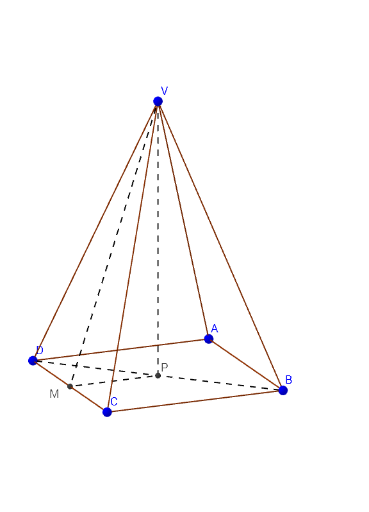
This example demonstrates the fundamental terminology of a right pyramid, including vertices, edges, faces, and angles. It involves core concepts like polygons, linear segments, and solid geometry. Constructed using commands such as Pyramid, Segment, Midpoint, Polygon, and Angle. Ideal for high school geometry education and beginners learning basic geometric principles.
GeoGebra Commands & Parameters
Pyramid(A, B, C, D, V) → a, faceABCD, edgeAV, edgeBV, edgeCV, edgeDV, faceABV, faceBCV, faceCDV, faceADV, edgeAB, edgeBC, edgeCD, edgeADSegment(D, B) → DBMidpoint(D, C) → MSegment(V, M) → VMMidpoint(D, B) → PSegment(P, M) → PMPolygon(A, B, C, D) → ABCD, a_1, b_1, c_1, dSegment(V, P) → VPPolygon(V, D, C) → VCD, c_2, CD, d_1Segment(V, M) → kAngle(V, M, C) → αSegment(P, M) → lAngle(P, M, C) → βAngle(V, M, P) → γPolygon(V, D, B) → VBD, b_2, v, d_2Segment(P, C) → CPAngle(C, P, B) → δSegment(V, P) → VP_2Angle(V, P, B) → εAngle(C, P, V) → ζ
AI Drawing Prompt Reference
Draw a right square pyramid with a square base and an apex above the base. Label the four base vertices and the apex. Connect the base vertices to form the base square, and connect the apex to each base vertex to form lateral edges. Draw one diagonal of the base, and mark the midpoints of this diagonal and one base edge. Connect these two midpoints with a segment. From the apex, draw segments to each of these midpoints. Within the base, connect the midpoint of the other base edge to the diagonal midpoint, and also connect that midpoint to the opposite base vertex. Finally, label several angles at the intersections of these segments, including angles formed by the apex-to-midpoint lines, the base-edge midpoint line, and the angles at the diagonal midpoint involving the apex and base vertices.
The prompt above was compiled from the original drawing commands and is for reference only.