
Quadratic Equation and Nature of Roots
Loading the math board and drawing, please wait…
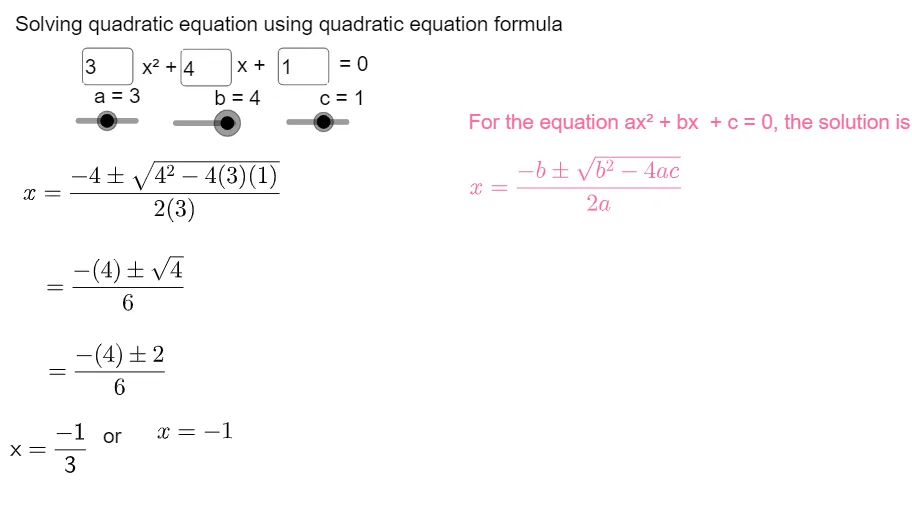
This example demonstrates the nature of roots of quadratic equations. It shows how to construct the quadratic function graph, analyze the sign of roots, and compute the discriminant. Key mathematical concepts include quadratic equations, discriminant, and root properties. Construction involves using GeoGebra commands like Textfield, SurdText, FractionText to label roots and discriminant, and InputBoxes to input parameters. Suitable for high school students learning discriminant and root properties, and for understanding quadratic curves in coordinate geometry.
GeoGebra Commands & Parameters
Textfield(a) → InputBox1Textfield(b) → InputBox2Textfield(c) → InputBox3SurdText(sqrt(d)) → gFractionText(ans1) → FrAns1FractionText(ans2) → FrAns2Textfield(a) → InputBox1_1Textfield(b) → InputBox2_1Textfield(c) → InputBox3_1Textfield(a) → InputBox1_2Textfield(b) → InputBox2_2Textfield(c) → InputBox3_2Textfield(a) → InputBox1_3Textfield(b) → InputBox2_3Textfield(c) → InputBox3_3Textfield(a) → InputBox1_4Textfield(b) → InputBox2_4Textfield(c) → InputBox3_4Textfield(a) → InputBox1_5Textfield(b) → InputBox2_5Textfield(c) → InputBox3_5Textfield(a) → InputBox1_6Textfield(b) → InputBox2_6Textfield(c) → InputBox3_6Textfield(a) → InputBox1_7Textfield(b) → InputBox2_7Textfield(c) → InputBox3_7Textfield(a) → InputBox1_8Textfield(b) → InputBox2_8Textfield(c) → InputBox3_8
AI Drawing Prompt Reference
Draw a quadratic function graph and show the nature of its roots. Input coefficients a, b, c, calculate the discriminant, and display its square root. Label the real or imaginary roots based on the sign of the discriminant, showing their values in both fraction and decimal forms. Observe how changes in parameters affect the roots and the intersection points of the graph with the x-axis.
The prompt above was compiled from the original drawing commands and is for reference only.