
Bar Model for Problems on Ratio, Rate, and Direct Proportion
Loading the math board and drawing, please wait…
In collections
Primary School Mathematics Collection
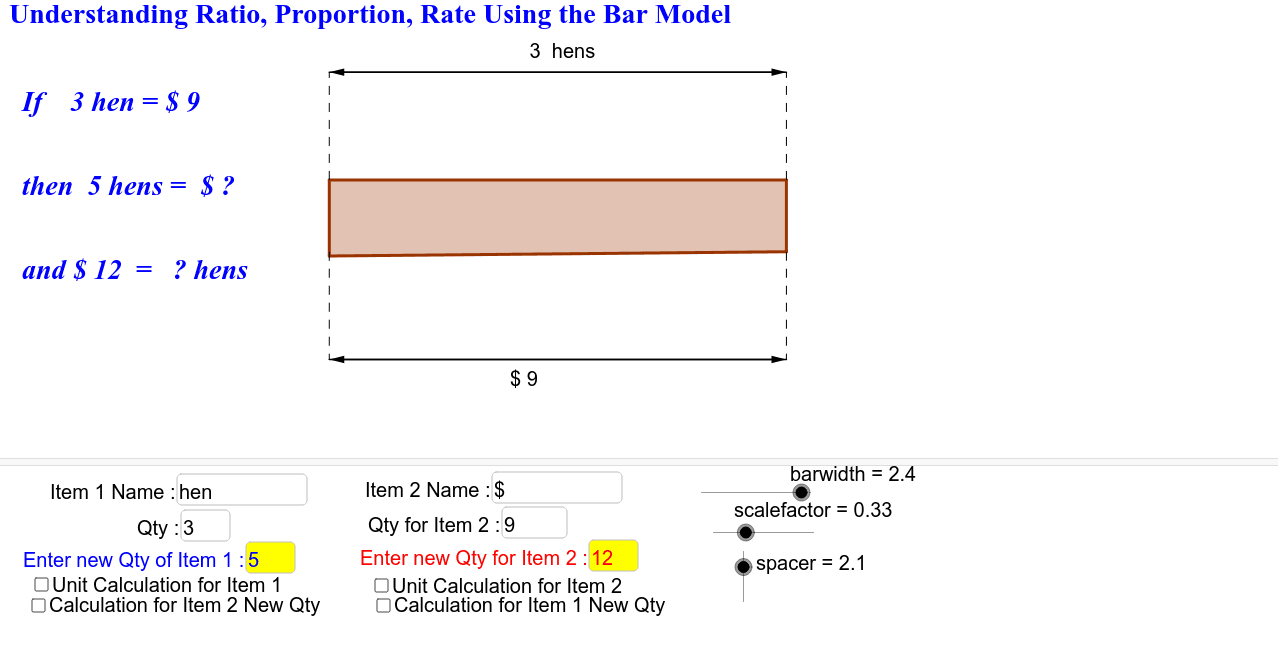
This GeoGebra applet demonstrates the arithmetic of ratio, rate, and direct proportion problems using an interactive bar model. The core mathematical concepts include proportional relationships, unit parts, and the visual representation of multiplicative comparisons between quantities. The construction uses GeoGebra commands such as Polygon to draw bars, Textfield for input boxes, Sequence for repeated elements, Vector and Midpoint for labeling and positioning, and Segment for auxiliary lines. Key objects include scalefactor, barwidth, points P_1 to P_4, input boxes (inputBox1-4), and text labels (textTitle, NameItem). Users can adjust values via input boxes or sliders, causing the bar lengths to update dynamically, which helps learners grasp the relationship between 'unit part' and 'total parts'. This applet is suitable for upper elementary to middle school students learning ratio and direct proportion, and can be used for classroom demonstrations or self-paced exploration, fostering the transition from visual models to algebraic reasoning.
GeoGebra Commands & Parameters
Polygon(P_1, P_2, P_3, P_4) → ModelBar1, p_1, p_2, p_3, p_4Textfield(a) → inputBox1Textfield(NameItem1) → inputBox2Textfield(NameItem2) → inputBox3Textfield(b) → inputBox4Sequence(Segment[(x(P_1) + ((i * c) * scalefactor / a), y(P_1)), (x(P_1) + ((i * c) * scalefactor / a), barwidth)], i, 1, a, 1) → UnitPartforItem1Sequence(Segment[(x(P_1) + ((i * c) * scalefactor / b), y(P_1)), (x(P_1) + ((i * c) * scalefactor / b), barwidth)], i, 1, b, 1) → UnitPartforItem2Vector(P_{1s}, P_{1e}) → v_{1r}Vector(P_{1e}, P_{1s}) → v_{1l}Midpoint(P_{1s}, P_{1e}) → P_{1txt1}Vector(P_{2s}, P_{2e}) → v_{2r}Vector(P_{2e}, P_{2s}) → v_{2l}Midpoint(P_{2s}, P_{2e}) → P_{2txt1}Vector((x(P_1) + (c * scalefactor / a), barwidth + spacer / 3), (x(P_1), barwidth + spacer / 3)) → s_{1l}Vector((x(P_1), barwidth + spacer / 3), (x(P_1) + (c * scalefactor / a), barwidth + spacer / 3)) → s_{1r}Segment((x(P_1) + (c * scalefactor / a), barwidth), (x(P_1) + (c * scalefactor / a), barwidth + spacer / 3)) → g_1Segment((x(P_1), barwidth), (x(P_1), barwidth + spacer / 3)) → f_1Segment((x(P_1), 1), (x(P_1), 1 - spacer / 3)) → f_2Segment((x(P_1) + (c * scalefactor / a), 1), (x(P_1) + (c * scalefactor / a), 1 - spacer / 3)) → g_2Vector((x(P_1), 1 - spacer / 3), (x(P_1) + (c * scalefactor / a), 1 - spacer / 3)) → s_{12r}Vector((x(P_1) + (c * scalefactor / a), 1 - spacer / 3), (x(P_1), 1 - spacer / 3)) → s_{12l}Textfield(a_2) → inputBox5Textfield(b_2) → inputBox6Vector((x(P_1) + ((a_2 * c) * scalefactor / a), barwidth + (2 * spacer / 3)), (x(P_1), barwidth + (2 * spacer / 3))) → s_{1nl}Vector((x(P_1), barwidth + (2 * spacer / 3)), (x(P_1) + ((a_2 * c) * scalefactor / a), barwidth + (2 * spacer / 3))) → s_{1nr}Sequence(Segment[(x(P_1) + ((i * c) * scalefactor / a), y(P_1)), (x(P_1) + ((i * c) * scalefactor / a), barwidth)], i, 1, a_2, 1) → nPartsForItem1Polygon(P_1, P_{2n1}, P_{3n1}, P_4) → ModelBarn1, p_5, p_{2n1}, p_{3n1}, p_6Segment((x(P_1), barwidth), (x(P_1), barwidth + (2 * spacer / 3))) → f_{1n}Segment((x(P_{2n1}), barwidth), (x(P_{2n1}), barwidth + (2 * spacer / 3))) → g_{1n}Segment((x(P_1), barwidth), (x(P_1), barwidth + spacer)) → f_0Segment((x(P_2), barwidth), (x(P_2), barwidth + spacer)) → g_0Vector((x(P_1), 1 - (2 * spacer / 3)), (x(P_1) + ((a_2 * c) * scalefactor / a), 1 - (2 * spacer / 3))) → s_{1n2r}Vector((x(P_1) + ((a_2 * c) * scalefactor / a), 1 - (2 * spacer / 3)), (x(P_1), 1 - (2 * spacer / 3))) → s_{1n2l}Segment((x(P_1), 1), (x(P_1), 1 - (2 * spacer / 3))) → f_{1n2}Segment((x(P_{2n1}), 1), (x(P_{2n1}), 1 - (2 * spacer / 3))) → g_{1n2}Segment((x(P_1), 1), (x(P_1), 1 - spacer)) → d_0Segment((x(P_2), 1), (x(P_2), 1 - spacer)) → e_0Vector((x(P_1) + (c * scalefactor / b), 1 - spacer / 3), (x(P_1), 1 - spacer / 3)) → s_{2l}Vector((x(P_1), 1 - spacer / 3), (x(P_1) + (c * scalefactor / b), 1 - spacer / 3)) → s_{2r}Segment((x(P_1), 1), (x(P_1), 1 - spacer / 3)) → d_1Segment((x(P_1) + (c * scalefactor / b), 1), (x(P_1) + (c * scalefactor / b), 1 - spacer / 3)) → e_1Segment((x(P_1) + (c * scalefactor / b), barwidth), (x(P_1) + (c * scalefactor / b), barwidth + spacer / 3)) → e_2Segment((x(P_1), barwidth), (x(P_1), barwidth + spacer / 3)) → d_2Vector((x(P_1), barwidth + spacer / 3), (x(P_1) + (c * scalefactor / b), barwidth + spacer / 3)) → s_{21r}Vector((x(P_1) + (c * scalefactor / b), barwidth + spacer / 3), (x(P_1), barwidth + spacer / 3)) → s_{21l}Polygon(P_1, P_{2n2}, P_{3n2}, P_4) → ModelBarn2, p_7, p_{2n2}, p_{3n2}, p_8Sequence(Segment[(x(P_1) + ((i * c) * scalefactor / b), y(P_1)), (x(P_1) + ((i * c) * scalefactor / b), barwidth)], i, 1, b_2, 1) → nPartsForItem2Segment((x(P_{2n2}), 1), (x(P_{2n2}), 1 - (2 * spacer / 3))) → e_{1n}Segment((x(P_1), 1), (x(P_1), 1 - (2 * spacer / 3))) → d_{1n}Vector((x(P_{2n2}), 1 - (2 * spacer / 3)), (x(P_1), 1 - (2 * spacer / 3))) → s_{2nl}Vector((x(P_1), 1 - (2 * spacer / 3)), (x(P_{2n2}), 1 - (2 * spacer / 3))) → s_{2nr}Segment((x(P_{2n2}), barwidth), (x(P_{2n2}), barwidth + (2 * spacer / 3))) → e_{1n2}Segment((x(P_1), barwidth), (x(P_1), barwidth + (2 * spacer / 3))) → d_{1n2}Vector((x(P_1), barwidth + (2 * spacer / 3)), (x(P_{2n2}), barwidth + (2 * spacer / 3))) → s_{2n1r}Vector((x(P_{2n2}), barwidth + (2 * spacer / 3)), (x(P_1), barwidth + (2 * spacer / 3))) → s_{2n1l}
AI Drawing Prompt Reference
Draw a bar model to represent ratio, rate, and direct proportion problems. First, draw a rectangular bar. Then, based on the values in input boxes a and b, draw a total of a units and b units on the bar. Next, draw auxiliary lines and vectors to mark the start and end points of the bar. Finally, adjust the number of unit parts based on the values in input boxes a_2 and b_2, and draw new auxiliary lines and vectors.
The prompt above was compiled from the original drawing commands and is for reference only.