
Bar Fractions: Visualizing Fractions and Division with Geometric Bars
Loading the math board and drawing, please wait…
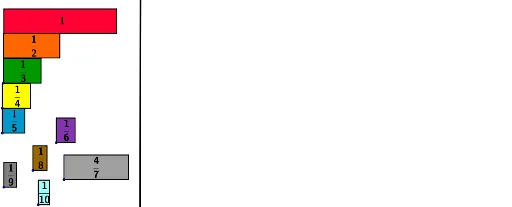
This GeoGebra example demonstrates the concept of fractions using bar models, where rectangular bars are divided into equal parts to represent fractional quantities and division. The core mathematical concepts include fraction meaning, equal partitioning, division, and proportional reasoning. The construction uses commands such as Polygon to create bars, Line to divide them, and Text to label fractions, along with custom tools (Outil6-11) for interactive manipulation. Objects include points A, B, C, D, polygons poly1-poly4, lines, and text labels. This is suitable for upper elementary and middle school students to grasp fraction concepts, and for teachers to illustrate the connection between fractions and division in a visual, interactive way.
GeoGebra Commands & Parameters
Polygon(C, D, B, A) → poly1, c, d, b, aPolygon(H_1, I_2, G, F) → poly2, h, i, g, fText("\frac{1}{2}", Centroid[poly2] + (-0.2, 0.85), true, true) → texte4Text("1", Centroid[poly1] + (-0.2, 0.5), true, true) → texte1Polygon(E, J, L, K) → poly3, e, j, l, kText("\frac{1}{4}", Centroid[poly3] + (-0.3, 0.875), true, true) → texte2Polygon(O, P, N, M_2) → poly4, o, p, n, mText("\frac{1}{3}", Centroid[poly4] + (-0.3, 0.875), true, true) → texte3Polygon(S, T, R, Q_2) → poly5, s, t, r, qText("\frac{1}{5}", Centroid[poly5] + (-0.3, 0.9), true, true) → texte5Outil6(H) → texte6, poly6, a_1, b_1, c_1, d_1Outil7(M) → e_1, f_1, g_1, h_1, poly7, texte7Outil8(U) → poly8, i_1, j_1, k_1, l_1, texte8Outil9(V) → poly9, m_1, n_1, p_1, q_1, texte9Outil11(4, W, 7) → poly10, r_1, s_1, t_1, a_2, texte10Line(Z, A_1) → b_2
AI Drawing Prompt Reference
Draw a rectangle divided into two halves to show 1/2, then draw another rectangle divided into four equal parts to show 1/4, followed by a rectangle divided into three equal parts to show 1/3, and then a rectangle divided into five equal parts to show 1/5. Finally, use a custom tool to draw a complex shape and display the fractions 1/4 and 7/2. Make sure the fraction labels are correctly placed at the center of each rectangle.
The prompt above was compiled from the original drawing commands and is for reference only.