
ASA Triangle Exploration
Loading the math board and drawing, please wait…
In collections
Triangle Congruence Exploration
Triangle Congruence
Triangle Congruence
Triangle Congruence
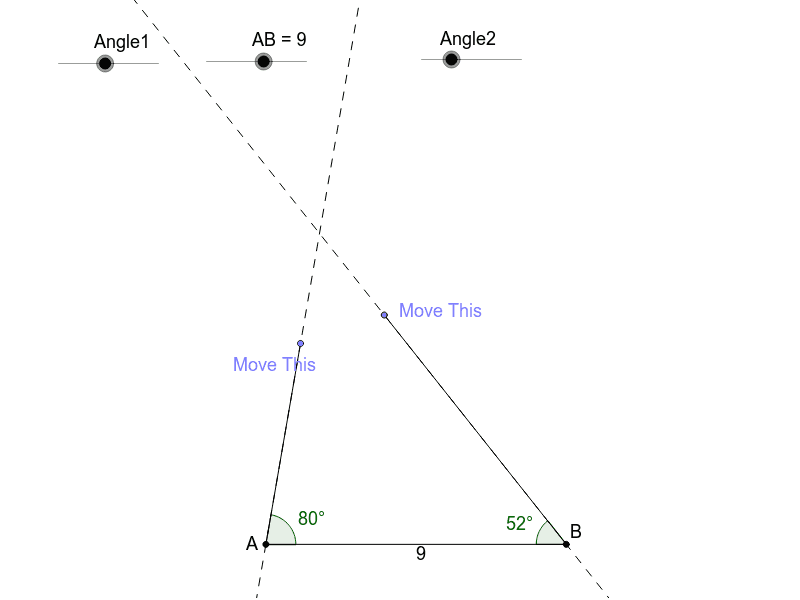
This example demonstrates how to create unique triangles by setting an angle-side-angle combination and moving the endpoints of the angles. It involves core math concepts like triangle congruence (ASA), geometric constructions, and transformations. Key GeoGebra commands used include Point, Segment, Rotate, Angle, Line, Intersect, and Polygon. Suitable for middle school and above, it helps students understand triangle congruence criteria and geometric constructions.
GeoGebra Commands & Parameters
Point(Circle[A, abs(AB)]) → BSegment(A, B) → aRotate(B, Angle1, A) → B'Angle(B, A, B') → αLine(A, B') → bRotate(A, (-Angle2), B) → A'Angle(A', B, A) → βLine(A', B) → cPoint(b) → CSegment(A, C) → dPoint(c) → DSegment(B, D) → eIntersect(b, c) → EPolygon(A, E, B) → poly1, b_1, a_2, e_1Segment(C, D) → f
AI Drawing Prompt Reference
Draw a triangle by first setting an angle and its opposite side, then construct another angle by rotating the endpoints of the first angle, and finally use these two angles and the side between them to form a unique triangle, demonstrating the principle of triangle congruence by angle-side-angle (ASA).
The prompt above was compiled from the original drawing commands and is for reference only.