
Aryabhata's Half Chord
Loading the math board and drawing, please wait…
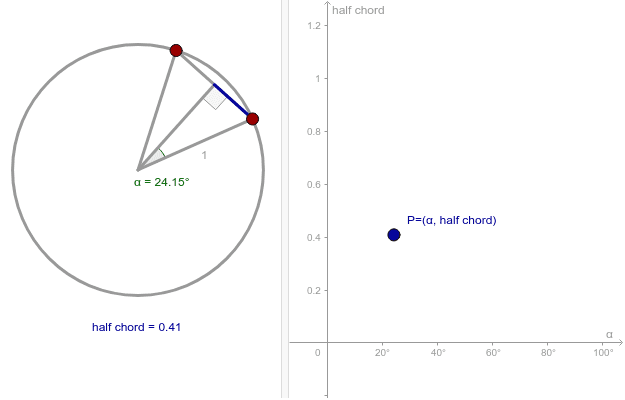
This example demonstrates the drawing and properties of a half chord within a circle. It involves core mathematical concepts such as circle, trigonometry, linear functions, and curve sketching. Construction highlights include using GeoGebra commands like Intersect, Circle, Point, Segment, Midpoint, and Angle. Suitable for high school students and teachers learning analytical geometry, trigonometric functions, and geometric constructions.
GeoGebra Commands & Parameters
Intersect(xAxis, yAxis) → ACircle(A, 1) → cPoint(c) → BPoint(c) → CSegment(A, B) → aSegment(A, C) → bSegment(C, B) → dMidpoint(d) → DSegment(A, D) → eAngle(B, A, D) → αSegment(D, B) → chordAngle(A, D, B) → β
AI Drawing Prompt Reference
Draw a circle centered at the origin with radius 1. Mark two points on the circle and connect each point to the origin to form two line segments. Find the midpoint of the angle formed by these two line segments and connect it to one of the points on the circle. Then, connect the two points on the circle to this midpoint to form two more line segments. Finally, draw one of these line segments and label the angles formed by the two line segments and the intersection of this line segment with the circle.
The prompt above was compiled from the original drawing commands and is for reference only.