
Artistic Rotational Symmetry: Curves from Triangle Constructions
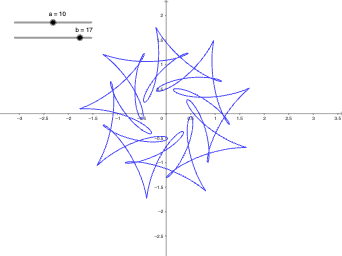
Loading the math board and drawing, please wait…
This example demonstrates how to build an aesthetically pleasing figure using the idea of rotational symmetry, starting from triangle-related geometric constructions and turning the constraints into visible curves. The key mathematical concepts include rotational symmetry (a symmetry transformation), geometric construction principles, and triangle geometry themes such as isosceles-triangle relationships. The construction relies on GeoGebra’s coordinate-geometry workflow: CurveCartesian is used to draw Cartesian curves in the plane, while objects a, b, and c provide the underlying definitions (e.g., expressions/parameters/constraints) that shape the resulting curve set and reveal the symmetry pattern. Suitable for upper secondary students and introductory university courses, especially for lessons and explorations on transformations, symmetry, and computer-aided geometric visualization.
GeoGebra Commands & Parameters
CurveCartesian(cos(t) + (1 / 2 * cos((a * t))) + (1 / 3 * sin((b * t))), sin(t) + (1 / 2 * sin((a * t))) + (1 / 3 * cos((b * t))), t, 0, (2 * pi)) → c
AI Drawing Prompt Reference
Create an aesthetically pleasing figure with rotational symmetry based on triangle construction. Start by constructing an isosceles triangle, then use the CurveCartesian command to draw a complex curve from t=0 to 2π, showcasing the rotational symmetry.
The prompt above was compiled from the original drawing commands and is for reference only.