
Triangle Rotations on the Coordinate Plane
Loading the math board and drawing, please wait…
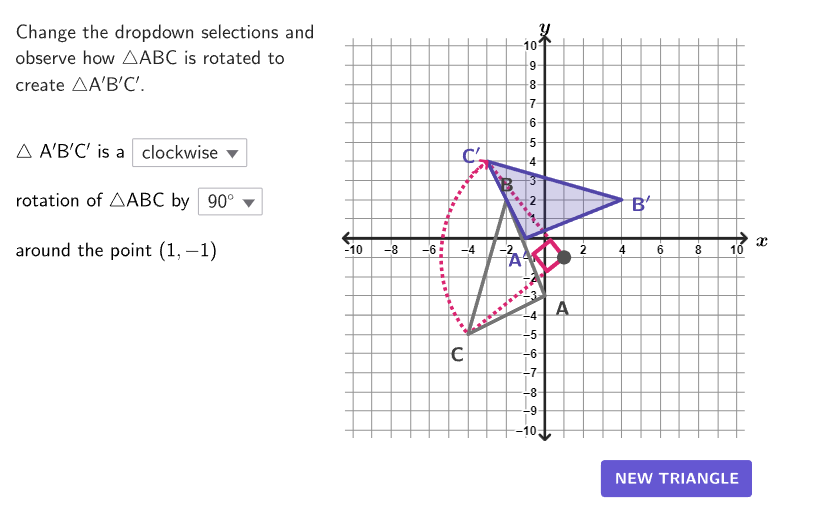
Explore triangle rotations on the coordinate plane with animations of different directions, angles, and centers of rotation. Core math concepts include rotation, coordinate transformation, and geometric transformations. Constructed using GeoGebra commands like Rotate, UnitOrthogonalVector, Angle. Suitable for grades 6-8 learning coordinate geometry and transformations.
GeoGebra Commands & Parameters
Shuffle(Sequence[100]) → randomList2, {41, 64, 98, 6, 11, 34, 90, 18, 29, 82, 72, 21, 88, 52, 36, 86, 10, 33, 22, 62, 89, 32, 26, 37, 73, 74, 27, 15, 80, 65, 95, 45, 99, 13, 50, 58, 91, 44, 1, 51, 2, 16, 47, 79, 9, 60, 55, 85, 78, 25, 48, 43, 92, 38, 28, 19, 69, 87, 57, 35, 49, 30, 97, 20, 75, 70, 42, 68, 46, 61, 24, 81, 39, 100, 76, 7, 4, 59, 54, 83, 5, 8, 77, 93, 14, 12, 56, 67, 40, 53, 71, 3, 23, 66, 17, 96, 94, 31, 63, 84}Shuffle(Sequence[100]) → randomList1, {54, 48, 30, 63, 96, 57, 84, 51, 15, 2, 92, 10, 45, 77, 68, 100, 72, 87, 7, 55, 80, 37, 22, 56, 4, 67, 61, 62, 60, 89, 32, 43, 58, 12, 71, 38, 31, 65, 70, 49, 66, 1, 11, 3, 53, 9, 46, 36, 23, 28, 79, 18, 52, 35, 25, 99, 14, 78, 6, 19, 16, 93, 97, 39, 59, 24, 90, 21, 20, 91, 69, 94, 5, 26, 64, 73, 85, 82, 95, 40, 8, 13, 86, 76, 34, 88, 98, 41, 81, 50, 75, 17, 27, 83, 29, 47, 42, 44, 33, 74}Zip((("$\text{" * A) * "}$"), A, {"90^\circ ", "180^\circ", "270^\circ"}) → selectAngleSelectedIndex(selectAngle) → selectedAngleZip((("$\text{" * A) * " }$"), A, {"clockwise", "counterclockwise"}) → selectDirectionSelectedIndex(selectDirection) → selectedDirectionFlatten(Sequence[Sequence[(i, j), i, -10, 10], j, -10, 10]) → gridPointsElement(randomList1, Mod[countQuestion, Length[randomList1]] + 1) → randomNum1Element({verticesCase1(indexCase1), verticesCase2(indexCase2), verticesCase3(indexCase3)}, caseNum) → currentVerticesClosestPoint(gridPoints, TriangleCenter[currentVertices(1), currentVertices(2), currentVertices(3), 1]) → CenterCase2Element({(0, 0), CenterCase2, centersCase3(indexCase3)}, caseNum) → RotationPointElement(randomList2, Mod[countQuestion, Length[randomList2]] + 1) → randomNum2Corner(5) → layoutAppSizePolygon({(-10.5, -10.5), (-10.5, 10.5), (10.5, 10.5), (10.5, -10.5)}) → viewboxZip(Vector[UnitVector[Vector[CenterCase2, A]]], A, currentVertices) → vLabelsPolygon(currentVertices) → triABCRotate(triABC, (slideRotate * rotateAngle°), RotationPoint) → rotationTriangleZip(Distance[RotationPoint, A], A, currentVertices) → distanceToCenterIndexOf(Max[distanceToCenter], distanceToCenter) → whichIndexSequence(Vertex[rotationTriangle, A], A, 1, 3) → rotatedVerticesZip(Vector[Rotate[A, rotateDegrees°, RotationPoint]], Vector[A], vLabels) → vLabelsRotatedAngle(currentVertices(whichIndex), RotationPoint, rotatedVertices(whichIndex)) → showAngleCounterClockwiseAngle(rotatedVertices(whichIndex), RotationPoint, currentVertices(whichIndex)) → showAngleClockwiseUnitOrthogonalVector(Segment[RotationPoint, rotatedVertices(whichIndex)]) → vArrowZip(Text[("" * A), B + C, false, true, 0, 0], A, {"A", "B", "C"}, B, currentVertices, Vector[C], vLabels) → labelsABCZip(Text[("" * A), B + C, false, true, 0, 0], A, {"A^{\prime}", "B^{\prime}", "C^{\prime}"}, B, rotatedVertices, Vector[C], vLabelsRotated) → labelsABCPrimeCircleArc(RotationPoint, If[¬clockwiseDirection, currentVertices(whichIndex), rotatedVertices(whichIndex)], If[¬clockwiseDirection, rotatedVertices(whichIndex), currentVertices(whichIndex)]) → displayRotationSegment(rotatedVertices(whichIndex) + (If[¬clockwiseDirection, -1, 1] * vArrow), rotatedVertices(whichIndex)) → directionArrowSegment((-10.5, 0), (10.5, 0)) → axisSegmentXSegment((0, -10.5), (0, 10.5)) → axisSegmentYText("y", (0, 11), true, true, 0, 0) → lblYText("x", (11.3, 0), true, true, 0, 0) → lblX
AI Drawing Prompt Reference
Draw a triangle on a coordinate plane and show its rotation animation. The figure includes an initial triangle, a rotated triangle, a rotation center, angle indicators, and direction arrows. The construction order is: first draw the coordinate plane and grid, then place the initial triangle, determine the rotation center, rotate the triangle, display the rotation angle and direction, and finally add labels and arrows to explain the rotation process.
The prompt above was compiled from the original drawing commands and is for reference only.