
Area of Trapezium - Geometric Demonstration
Loading the math board and drawing, please wait…
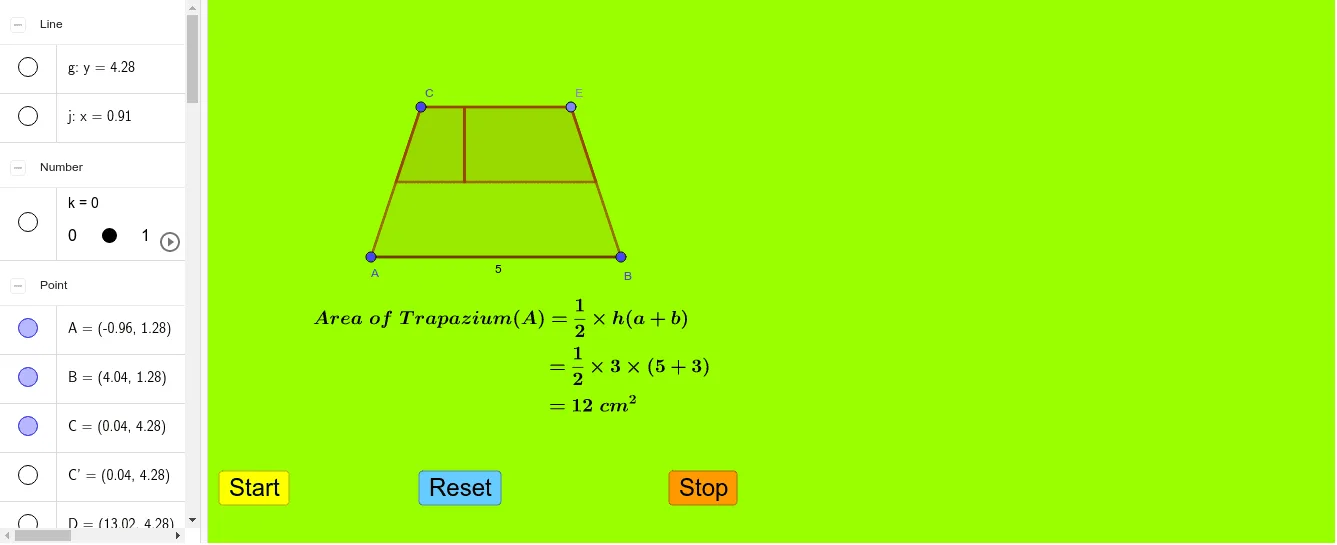
This GeoGebra example dynamically demonstrates the derivation of the area formula for a trapezium (trapezoid). The core mathematical concept is that the area equals half the sum of the parallel sides multiplied by the height. The construction uses commands such as Segment, Line, Point, Polygon, Midpoint, OrthogonalLine, Intersect, and Rotate to create auxiliary lines and rotate triangles, transforming the trapezium into a parallelogram or rectangle to visually prove the formula. Suitable for middle school or high school geometry classes, it helps students understand the formula's origin and enhances spatial reasoning through interactive manipulation.
GeoGebra Commands & Parameters
Segment(A, B) → fLine(C, f) → gPoint(g) → DSegment(C, D) → hPoint(h) → EPolygon(A, B, E, C) → q1, a, b, e, cMidpoint(c) → FMidpoint(b) → GSegment(F, G) → iPoint(e) → HOrthogonalLine(H, e) → jIntersect(i, j) → IPolygon(F, I, H, C) → q2, f_1, i_1, h_1, c_1Polygon(G, I, H, E) → q3, g_1, i_2, h_2, e_1Rotate(F, (k * 180°), F) → F'Rotate(I, (k * 180°), F) → I'Rotate(H, (k * 180°), F) → H'Rotate(C, (k * 180°), F) → C'Polygon(F', I', H', C') → q2', f', i', h', c'Rotate(G, ((-k) * 180), G) → G'Rotate(G, ((-k) * 180°), G) → G'_1Rotate(I, ((-k) * 180°), G) → I'_1Rotate(H, ((-k) * 180°), G) → H'_1Rotate(E, ((-k) * 180°), G) → E'Polygon(G'_1, I'_1, H'_1, E') → q3', g'_1, i'_1, h'_1, e'Polygon(A, B, G, F) → q4, a_1, b_1, g_2, f_2
AI Drawing Prompt Reference
Draw a trapezium with a horizontal bottom base and a slanted top base, whose endpoints lie above the bottom base's endpoints. From one endpoint of the top base, drop a perpendicular to the bottom base. Mark the midpoints of the two non-parallel sides and connect them to form a midsegment. Choose a point on this midsegment and draw a perpendicular to the top base through it, intersecting the midsegment. Using this intersection and the two side midpoints, construct two small triangles. Rotate each of these triangles by 180 degrees around its respective side midpoint, so they attach to the sides of the trapezium, transforming it into a rectangle. This visually demonstrates the derivation of the trapezium area formula.
The prompt above was compiled from the original drawing commands and is for reference only.