
Area of Parallelograms – Activity 2
Loading the math board and drawing, please wait…
In collections
Grade 6 Unit 1: Area and Surface Area
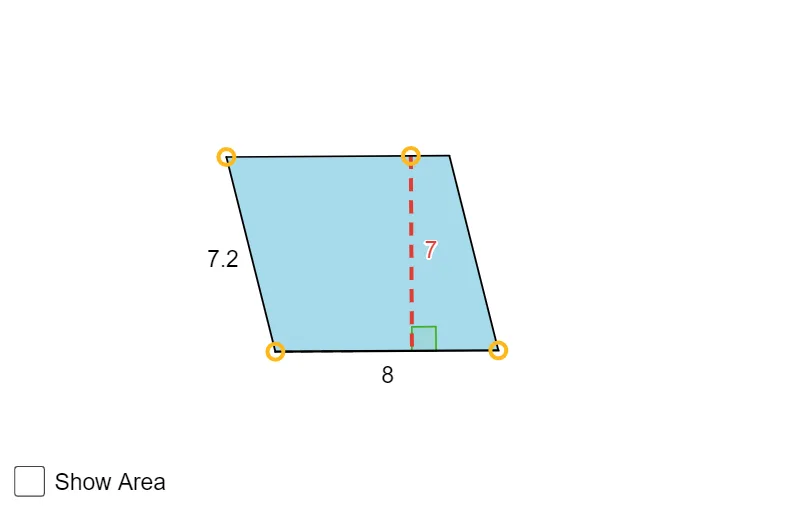
① This example demonstrates a dynamic construction that visually illustrates how the area of a parallelogram is derived. ② Core mathematical concepts include the parallelogram area formula (base × height), relationships between parallel and perpendicular lines, and the geometric interpretation of polygon area. ③ Construction highlights: the sketch uses GeoGebra commands Segment, Line, Intersect, Point, OrthogonalLine, Angle, Polygon, and PointIn to create vertices A, B, C, D, E, F, define base, height, angles α and β, build polygon poly1, and display the computed area via area_1 and text1. ④ Suitable for middle‑school geometry (grades 6‑8) as a visual aid for area concepts and for practice in geometric construction and inquiry‑based learning.
GeoGebra Commands & Parameters
Segment(C, B) → baseSegment(A, B) → gLine(C, g) → hLine(A, base) → iIntersect(h, i) → DSegment(A, D) → jSegment(D, C) → kPoint(j) → EOrthogonalLine(E, base) → lLine(C, B) → mOrthogonalLine(E, m) → nIntersect(m, n) → FSegment(E, F) → heightAngle(E, F, C) → αSegment(F, B) → qAngle(C, F, E) → βPolygon(C, B, A, D) → poly1, c, b, a, dSegment(F, C) → rPointIn(poly1) → Pointpoly1
AI Drawing Prompt Reference
Draw a parallelogram, labeling its base and height, and display the calculated area. Visually demonstrate how the area is derived using the product of the base and height, showing the relationship between parallel and perpendicular lines, and the geometric meaning of angles α and β. Start by constructing the four sides of the parallelogram, then find the height from the base, build a triangle using the height and base, complete the parallelogram, and calculate and display the area.
The prompt above was compiled from the original drawing commands and is for reference only.