
Area of a Circle - Wedge/Sector Demonstration
Loading the math board and drawing, please wait…
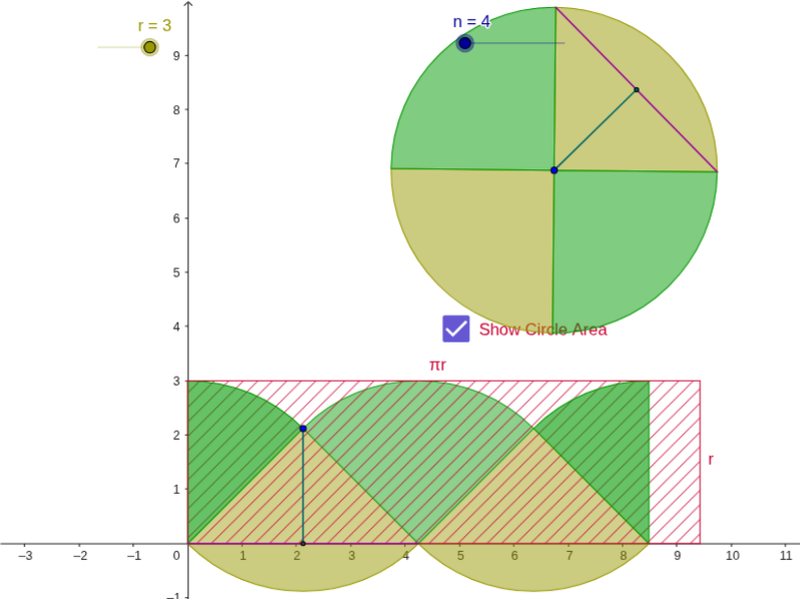
This example demonstrates how to calculate the area of a circle's sector by rotating and constructing polygons. Key mathematical concepts include the properties of circles and geometric transformations. It uses commands like Polygon, Circle, Rotate, Segment, Midpoint, Sequence, and CircleSector in GeoGebra. Suitable for middle school and above students to learn geometric construction and area calculation.
GeoGebra Commands & Parameters
Polygon((0, 0), (base, 0), (base, r), (0, r)) → poly1, a, b, c, dCircle(A, r) → ePoint(e) → BRotate(B, 360 * ° / n, A) → B'Segment(B, B') → dxMidpoint(dx) → CSegment(A, C) → dySequence(Rotate[B, j * 360 * ° / n, A], j, 0, n) → list1Sequence(CircleSector[A, Element[list1, j], Element[list1, j + 1]], j, 1, n, 2) → list2Sequence(CircleSector[A, Element[list1, j], Element[list1, j + 1]], j, 2, n, 2) → list3Sequence(CircleSector[(j * dx + dx / 2, dy), (j * dx + 0, 0), (j * dx + dx, 0)], j, 0, n / 2 - 1) → list5Sequence(CircleSector[(j * dx, 0), (j * dx + dx / 2, dy), (j * dx + (-dx) / 2, dy)], j, 1, n / 2 - 1) → list4CircleSector((0, 0), (dx / 2, dy), (0, dy)) → wedgeSCircleSector((n / 2 * dx + 0, 0), (n / 2 * dx, r), (n / 2 * dx - dx / 2, dy)) → wedgeESegment(D, D') → fMidpoint(f) → ESegment(A', E) → g
AI Drawing Prompt Reference
Draw a circle and demonstrate the area of a sector with a central angle of 360/n degrees by rotating and constructing polygons. First, draw a square, then draw a circle with the center as the starting point. Rotate a point on the circle, connect the center and the rotated point, construct a series of sectors, and finally show the entire sector area.
The prompt above was compiled from the original drawing commands and is for reference only.