
Area of a Circle Demonstration
Loading the math board and drawing, please wait…
In collections
CCSS G-GMD Geometric Measurement and Dimension
Areas/Heights
Areas/Heights
Area and Circumference Explained
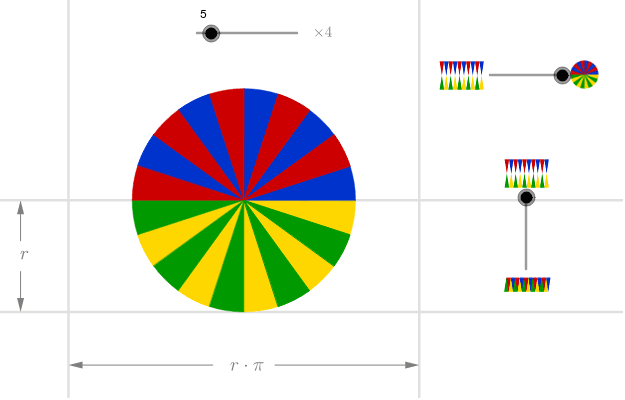
This example demonstrates how to calculate the area of a circle using geometric construction. Key mathematical concepts include circle properties and geometric construction. It uses GeoGebra commands such as Sequence, Point, OrthogonalLine, Mirror, Intersect, and Vector. Suitable for middle school and above students learning geometry and area calculation.
GeoGebra Commands & Parameters
Sequence((((2 * i) - 1) * a), i, 1, n) → anglesSequence(Vector[(d * Vector[(cos((-Element[angles, i])), sin((-Element[angles, i])))])], i, 1, n) → vectorsSequence(Midpoint[Cell[2, i], Cell[2, 1 + i]], i, 1, n) → midpointsSequence(Intersect[Circle[Cell[2, i], 1], OrthogonalLine[Element[midpoints, i], Line[Cell[2, i], Cell[2, 1 + i]]]], i, 1, n) → lowpointsSequence(Mirror[Element[lowpoints, i], yAxis], i, 1, n) → lowpoints2Sequence(Midpoint[Cell[3, i], Cell[3, 1 + i]], i, 1, n) → midpointsDownSequence(Intersect[Circle[Cell[3, i], 1], OrthogonalLine[Element[midpointsDown, i], Line[Cell[3, i], Cell[3, 1 + i]]]], i, 1, n) → uppointsSequence(Mirror[Element[uppoints, i], yAxis], i, 1, n) → uppoints2Point(yAxis) → BOrthogonalLine(B, yAxis) → gPoint(g) → CMirror(C, yAxis) → C'Point(h) → DMirror(D, (-2, -0.5)) → D'Intersect(b, xAxis) → EIntersect(c, h) → FIntersect(e, g) → GIntersect(g, f) → HVector(D', I) → uVector(D, F) → vVector(C', G) → wVector(C, H) → zSequence(CircleSector[Element[uppoints, i], Cell[3, 1 + i], Cell[3, i]], i, 1, n, 2) → sectorsDown1Sequence(CircleSector[Element[uppoints2, i], Mirror[Cell[3, i], yAxis], Mirror[Cell[3, 1 + i], yAxis]], i, 1, n, 2) → sectorsDown3Sequence(CircleSector[Element[lowpoints, i], Cell[2, 1 + i], Cell[2, i]], i, 1, n, 2) → sectors1Sequence(CircleSector[Element[lowpoints2, i] + ((2 * x(A)), 0), Mirror[Cell[2, i], yAxis] + ((2 * x(A)), 0), Mirror[Cell[2, 1 + i], yAxis] + ((2 * x(A)), 0)], i, 1, n, 2) → sectors3Sequence(CircleSector[Element[lowpoints, i], Cell[2, 1 + i], Cell[2, i]], i, 2, n, 2) → sectors2Sequence(CircleSector[Element[lowpoints2, i] + ((2 * x(A)), 0), Mirror[Cell[2, i], yAxis] + ((2 * x(A)), 0), Mirror[Cell[2, 1 + i], yAxis] + ((2 * x(A)), 0)], i, 2, n, 2) → sectors4Sequence(CircleSector[Element[uppoints, i], Cell[3, 1 + i], Cell[3, i]], i, 2, n, 2) → sectorsDown2Sequence(CircleSector[Element[uppoints2, i], Mirror[Cell[3, i], yAxis], Mirror[Cell[3, 1 + i], yAxis]], i, 2, n, 2) → sectorsDown4
AI Drawing Prompt Reference
Draw a circle and demonstrate how to calculate its area using geometric construction. Start by creating multiple vectors from the center, find intersection points between these vectors and the circle, then reflect these points symmetrically across the y-axis to form two rows. Connect the points in each row to create sectors, which together approximate the circle, visually illustrating the area calculation principle.
The prompt above was compiled from the original drawing commands and is for reference only.