
Area of a Circle (by Peeling)
Loading the math board and drawing, please wait…
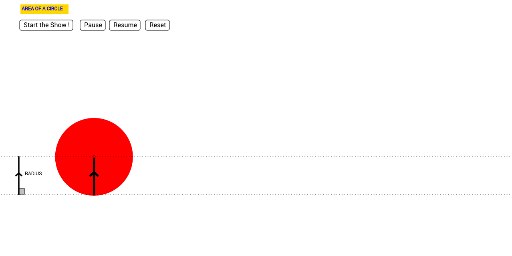
This applet demonstrates the informal discovery of the area of a circle by calculating the area of a triangle. It involves key concepts such as circles, triangles, and angles. Using GeoGebra commands like Circle, Segment, Angle, etc., students can dynamically explore the properties of circles. Suitable for middle school and above students to learn geometry and area calculation.
GeoGebra Commands & Parameters
Circle((0, 0), 1 / (1 - m)) → dCircle(L, 1 / (1 - m)) → eCircleArc((0, 1 / (1 - m)), C, L) → fSegment(C, A) → aPoint(j) → FOrthogonalLine(F, i) → bIntersect(i, b) → GSegment(F, G) → lCircle(E, (0.95 * 2 / (2 - m))) → d_2Segment(H, D) → nCircle(H, (0.95 * 2 / (2 - m))) → c_2Segment(I, K) → a_1CircleArc((0, 1 / (3 - m)), I, J) → f_2CircleArc((0, 1 / (2 - m)), (0, 0.05), E) → e_2Segment(N, O) → kCircleArc((0, 1 / (4 - m)), N, M) → g_2Segment(P, Q) → b_1CircleArc((0, 1 / (5 - m)), P, R) → h_2Segment(S, T) → i_1CircleArc((0, 1 / (6 - m)), S, U) → k_2Segment(V, W) → j_1CircleArc((0, 1 / (7 - m)), V, Z) → p_2Segment(A_1, B_1) → l_1CircleArc((0, 1 / (8 - m)), A_1, C_1) → q_2Segment(D_1, E_1) → m_1CircleArc((0, 1 / (9 - m)), D_1, F_1) → r_2Segment(G_1, H_1) → n_1CircleArc((0, 1 / (10 - m)), G_1, I_1) → s_2Segment(J_1, K_1) → a_2CircleArc((0, 1 / (11 - m)), J_1, L_1) → t_2Segment(M_1, N_1) → b_2CircleArc((0, 1 / (12 - m)), M_1, O_1) → c_3Segment(P_1, Q_1) → i_2CircleArc((0, 1 / (13 - m)), P_1, R_1) → d_3Segment(S_1, T_1) → j_2CircleArc((0, 1 / (14 - m)), S_1, U_1) → e_3Segment(V_1, W_1) → l_2Segment(A_2, B_2) → m_2CircleArc((0, 1 / (16 - m)), A_2, C_2) → g_3CircleArc((0, 1 / (15 - m)), V_1, Z_1) → f_3Segment(D_2, E_2) → n_2CircleArc((0, 1 / (17 - m)), D_2, F_2) → h_3Segment(G_2, H_2) → a_3CircleArc((0, 1 / (18 - m)), G_2, I_2) → k_3Segment(J_2, K_2) → b_3CircleArc((0, 1 / (19 - m)), J_2, L_2) → p_3Segment(M_2, N_2) → i_3CircleArc((0, 1 / (20 - m)), M_2, O_2) → q_3Segment((0, 0), (0, 1)) → j_3Segment((0, 1), (6.283185307179586, 0)) → l_3Segment((0, 0), (6.283185307179586, 0)) → m_3Angle(A, C, P_2) → αAngle(A, G, F) → βSegment((-2, 0), (-2, 1)) → s_3Segment((0, 0), (6.283185307179586, 0)) → t_3
AI Drawing Prompt Reference
Draw a circle and demonstrate the area of a circle by calculating the area of a triangle. Start by drawing a circle, then draw a line segment from the center to the circumference. Take a point on the segment and draw a perpendicular line to the circumference, marking the intersection point. Connect this point to the center to form a triangle. Adjust parameters dynamically to show the relationship between different-sized triangles and the circle, ultimately deriving the formula for the area of a circle.
The prompt above was compiled from the original drawing commands and is for reference only.