
Area Model Construction for Multiplying a 3-Digit by a 2-Digit Number
Loading the math board and drawing, please wait…
In collections
Multiplication with Area Models
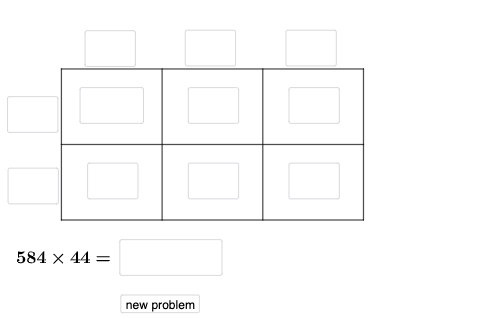
This example demonstrates how to multiply a 3-digit number by a 2-digit number using an area model. The product is visualized by decomposing the figure into rectangles (and polygonal regions) whose areas correspond to the partial products, making the algorithmic multiplication feel like a geometric area computation. Key mathematics concepts include multi-digit multiplication via area representation, partitioning (breaking digits into place-value components such as tens/ones), and mapping algebraic terms to geometric subregions. The construction is built from the provided GeoGebra workflow: Intersect is used to determine key intersection points; Point creates the vertices; Polygon outlines the partition regions; Segment builds the boundary edges; Random and Textfield introduce adjustable values and labels; and If controls conditional behavior (e.g., which elements appear or how parameters are selected). The object set includes many labeled points and parameter-like symbols (such as A–L and q1–q6, a_{2}, e, g, l_{2}, f_{2}, h_{4}, etc.), reflecting an interactive, partition-based geometric model. Suitable for upper elementary through middle school learning, classroom visualization, and GeoGebra-based exploratory teaching.
GeoGebra Commands & Parameters
Intersect(xAxis, yAxis) → APoint(xAxis) → BPoint(yAxis) → DPoint(xAxis) → EPoint(xAxis) → FPoint(yAxis) → LPolygon(A, E, G, L) → q1, a_{2}, e, g_{4}, l_{2}Polygon(E, F, H, G) → q2, e_1, f_{2}, h_{4}, g_1Polygon(F, B, I, H) → q3, f_1, b_{2}, i, h_1Polygon(H, I, C, K) → q4, h_2, i_1, c_{2}, k_{2}Polygon(G, H, K, J) → q5, g_2, h_3, k_1, j_{2}Polygon(L, G, J, D) → q6, l_1, g_3, j_1, d_{2}Segment(A, B) → m_{2}Segment(B, C) → n_{2}Segment(C, D) → pSegment(D, A) → qSegment(L, I) → rSegment(J, E) → sSegment(K, F) → tRandom(1, 9) → oRandom(1, 9) → uRandom(1, 9) → vRandom(1, 9) → wRandom(1, 9) → a_1Random(1, 9) → b_1Textfield(d_1) → aTextfield(m_1) → bTextfield(n_1) → cTextfield(t_1) → dTextfield(u_1) → fTextfield(o_1) → gTextfield(p_1) → hTextfield(q_1) → jTextfield(r_1) → kTextfield(s_1) → lTextfield(ansguess) → nIf(d_1 ≟ (100 * o), "√", "X") → text1If(m_1 ≟ (10 * u), "√", "X") → text2If(n_1 ≟ v, "√", "X") → text3If(t_1 ≟ (10 * w), "√", "X") → text4If(u_1 ≟ a_1, "√", "X") → text5Textfield(v_1) → mIf(ansguess ≟ produc, "☺", "☹ ") → text7
AI Drawing Prompt Reference
Draw an area model diagram for multi-digit multiplication composed of a large rectangle partitioned into six smaller rectangular regions on a coordinate grid, each representing a partial product in the multiplication process. Include boundary lines that divide the main rectangle into subsections from corners to opposite edges. Leave space for displaying numeric labels and calculation results, demonstrating how geometric area can visualize abstract multiplication computations.
The prompt above was compiled from the original drawing commands and is for reference only.