
Area Model and Factored Form vs Standard Form (Black and White Version)
Loading the math board and drawing, please wait…
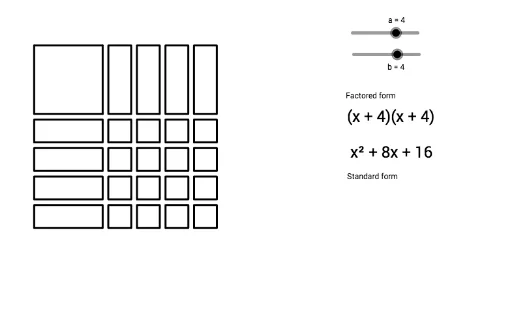
① This example demonstrates the equivalence between the factored form and standard form of a quadratic polynomial using an area model, presented in a black-and-white version for clear visual contrast. ② Core mathematical concepts include polynomial multiplication, factoring, the area model (rectangle decomposition), and the correspondence between algebraic expressions and geometric areas. ③ Construction highlights: The GeoGebra commands Polygon and Sequence are used to create rectangular regions and ordered lists, with multiple text objects (text1 through text10) labeling algebraic expressions and area values. Key objects include a, b, c, d, e, poly1, list1, list2, list3, and others, forming a dynamic visual link between the area model and algebraic forms. ④ Suitable for middle school to high school students learning the connection between algebra and geometry, and for teachers demonstrating the geometric meaning of factoring, aiding in understanding the conversion between standard and factored forms.
GeoGebra Commands & Parameters
Polygon(A, B, D, C) → poly1, a_1, e, d, cSequence(Polygon[(3.25 + (1.25 * n), 3), (4.25 + (1.25 * n), 3), (4.25 + (1.25 * n), 0), (3.25 + (1.25 * n), 0)], n, 0, a - 1, 1) → list1Sequence(Polygon[(0, -0.25 - (1.25 * n)), (0, -1.25 - (1.25 * n)), (3, -1.25 - (1.25 * n)), (3, -0.25 - (1.25 * n))], n, 0, b - 1, 1) → list2Sequence(Sequence[Polygon[(3.25 + (1.25 * n), -0.25 - (1.25 * m)), (4.25 + (1.25 * n), -0.25 - (1.25 * m)), (4.25 + (1.25 * n), -1.25 - (1.25 * m)), (3.25 + (1.25 * n), -1.25 - (1.25 * m))], n, 0, a - 1, 1], m, 0, b - 1, 1) → list3
AI Drawing Prompt Reference
Draw a visual representation of the equivalence between the factored form and standard form of a quadratic polynomial. Start by drawing a rectangular area, then divide it into smaller rectangles to illustrate the factored form. Use different colors or shading to represent the polynomial in standard form, with each rectangle's area corresponding to a term in the polynomial. Finally, label each rectangle with its area and corresponding algebraic expression to create a dynamic link between geometry and algebra.
The prompt above was compiled from the original drawing commands and is for reference only.