
Area Model and Factored Form by David Wees
Loading the math board and drawing, please wait…
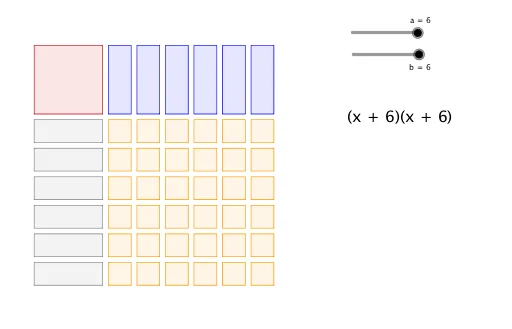
This example demonstrates how to visually understand polynomial factoring through an area model. Key math concepts include area calculation, plane figures, geometry transformations, and integer operations. GeoGebra commands like Polygon and Sequence are used to construct objects such as points A, B, C, D, and polygon poly1, with slider animations to illustrate transformations. Suitable for middle school and above mathematics education, aiding in grasping the connection between algebra and geometry.
GeoGebra Commands & Parameters
Polygon(A, B, D, C) → poly1, a_1, e, d, cSequence(Polygon[(3.25 + (1.25 * n), 3), (4.25 + (1.25 * n), 3), (4.25 + (1.25 * n), 0), (3.25 + (1.25 * n), 0)], n, 0, a - 1, 1) → list1Sequence(Polygon[(0, -0.25 - (1.25 * n)), (0, -1.25 - (1.25 * n)), (3, -1.25 - (1.25 * n)), (3, -0.25 - (1.25 * n))], n, 0, b - 1, 1) → list2Sequence(Sequence[Polygon[(3.25 + (1.25 * n), -0.25 - (1.25 * m)), (4.25 + (1.25 * n), -0.25 - (1.25 * m)), (4.25 + (1.25 * n), -1.25 - (1.25 * m)), (3.25 + (1.25 * n), -1.25 - (1.25 * m))], n, 0, a - 1, 1], m, 0, b - 1, 1) → list3