
4Q Quiz: Area Model for Multiplying Two-Digit by Two-Digit Numbers
Loading the math board and drawing, please wait…
In collections
Multiplication with Area Models
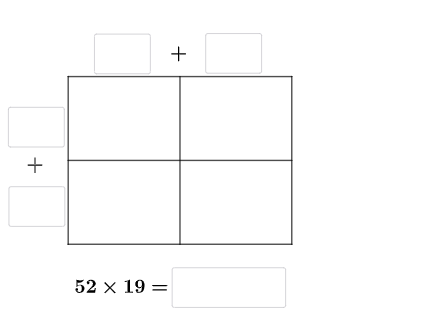
This example demonstrates how to use a flexible area model to multiply a two-digit number by another two-digit number by partitioning the overall rectangle into sub-rectangles. The visual layout makes the multiplication as “areas” and then uses area addition to obtain the final product. Key concepts include place-value decomposition (tens and ones), the area interpretation of multiplication, and block (distributive) multiplication. Construction highlights: Intersect is used to determine key intersection points that define the partition boundaries; Point, Segment, and Polygon create the labeled geometry and the sub-regions whose areas represent partial products; Textfield places dynamic labels; If adds quiz-like conditional logic; Random generates different problem values while keeping the model structure consistent. The scene is organized around geometric objects and labeled points/variables (e.g., A, D, E, …, L and q1, q2, etc.) to support an interactive “4Q quiz” workflow. Suitable for primary upper grades through middle school, classroom demonstrations, and self-paced interactive practice.
GeoGebra Commands & Parameters
Intersect(xAxis, yAxis) → APoint(yAxis) → DPoint(xAxis) → EPoint(xAxis) → FPoint(yAxis) → LPolygon(A, E, G, L) → q1, a_{2}, e, g_{4}, l_{2}Polygon(E, F, H, G) → q2, e_1, f_{2}, h_{4}, g_1Polygon(G, H, K, J) → q5, g_2, h_3, k_1, j_{2}Polygon(L, G, J, D) → q6, l_1, g_3, j_1, d_{2}Segment(D, A) → qSegment(J, E) → sSegment(K, F) → tRandom(1, 9) → oRandom(1, 9) → uRandom(1, 9) → vRandom(1, 9) → wRandom(1, 9) → a_1Random(1, 9) → b_1Textfield(d_1) → aTextfield(m_1) → bTextfield(t_1) → dTextfield(u_1) → fTextfield(o_1) → gTextfield(p_1) → hTextfield(r_1) → kTextfield(s_1) → lTextfield(ansguess) → nIf(n_1 ≟ v, "√", "X") → text3If(ansguess ≟ produc, "☺", "☹ ") → text7Segment(L, H) → rSegment(A, F) → m_{2}Segment(D, K) → pIf(d_1 + m_1 ≟ (10 * u) + v, "√", "X") → text2If(t_1 + u_1 ≟ (10 * w) + a_1, "√", "X") → text5
AI Drawing Prompt Reference
Draw a rectangle divided into four smaller rectangles to represent the multiplication of two two-digit numbers. Mark key intersection points and boundaries with points and lines, and label the area of each small rectangle to show the multiplication process. Add sliders and text fields to input two two-digit numbers, dynamically display the product and partial products, and use check marks or crosses to indicate if the answer is correct.
The prompt above was compiled from the original drawing commands and is for reference only.